
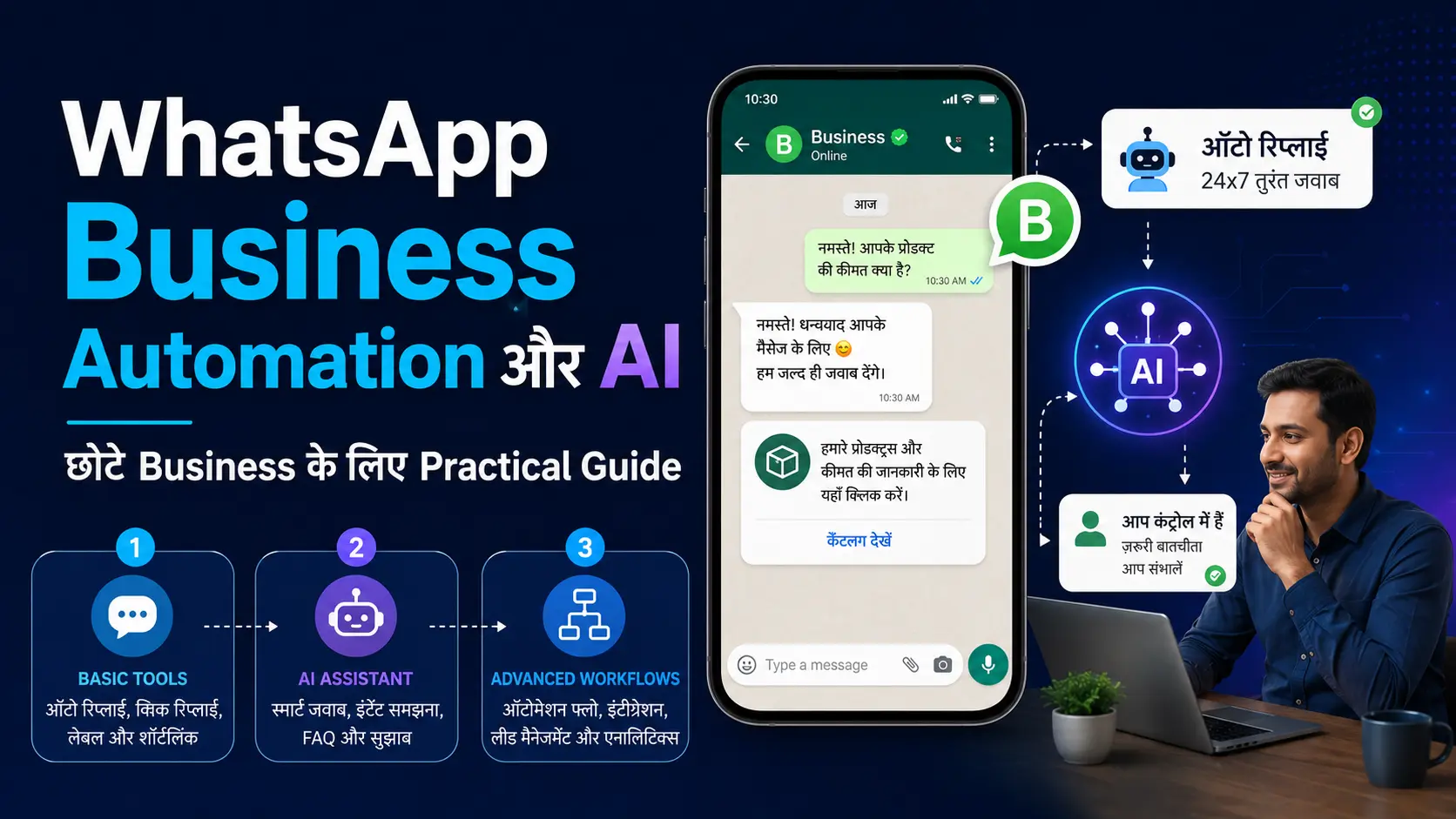
WhatsApp Business में Greeting Message, Away Message और Quick Replies जैसे tools पहले से मौजूद हैं, जो बार-बार होने वाले communication को आसान बनाते हैं। लेकिन ये fixed settings पर काम करते हैं और customer के हर सवाल को समझकर नया जवाब तैयार नहीं करते।
अब कुछ eligible businesses को Meta Business Agent जैसे AI features भी मिल रहे हैं, जो business की उपलब्ध information के आधार पर customer questions का जवाब देने में मदद कर सकते हैं।
बड़े message volume, multiple support agents या CRM integration जैसी जरूरतों के लिए WhatsApp Business Platform अलग advanced option है। ये सभी सुविधाएँ हर business के लिए जरूरी नहीं होतीं और उनकी availability account तथा rollout के अनुसार बदल सकती है।
इस guide में आप समझेंगे कि WhatsApp Business Automation क्या है, basic tools और AI में क्या अंतर है, Meta Business Agent कब उपयोगी हो सकता है और किस स्थिति में simple Business App ही पर्याप्त है।
- WhatsApp Business Automation का सही अर्थ क्या है?
- Level 1: Basic Automation किन businesses के लिए पर्याप्त है?
- Meta AI और Meta Business Agent एक जैसे नहीं हैं
- Meta Business Agent किसे मिल सकता है?
- क्या आपके business को AI की जरूरत है?
- AI Agent चालू करने से पहले information तैयार करें
- Business Profile और Catalog पहले update करें
- AI Replies को customers के लिए खोलने से पहले test करें
- Human Takeover कब जरूरी है?
- AI को pause या बंद कब करना चाहिए?
- WhatsApp Business Platform कब जरूरी हो सकता है?
- WhatsApp Flows क्या है?
- Third-party Automation Tool चुनते समय सावधानी
- Customer को AI के भरोसे अकेला न छोड़ें
- Common mistakes जिन्हें रोकना चाहिए
- अपने Business के लिए सही Option चुनें
- अक्सर पूछे जाने वाले सवाल
- निष्कर्ष
- अब अपने लिए सही Automation Level चुनें
WhatsApp Business Automation का सही अर्थ क्या है?
WhatsApp Business Automation का अर्थ हर message को chatbot के हवाले कर देना नहीं है। इसका सीधा मतलब है—बार-बार होने वाले communication को ऐसे tools से आसान बनाना, जिससे business owner का समय बचे और customer को सही समय पर उपयोगी जवाब मिल सके।
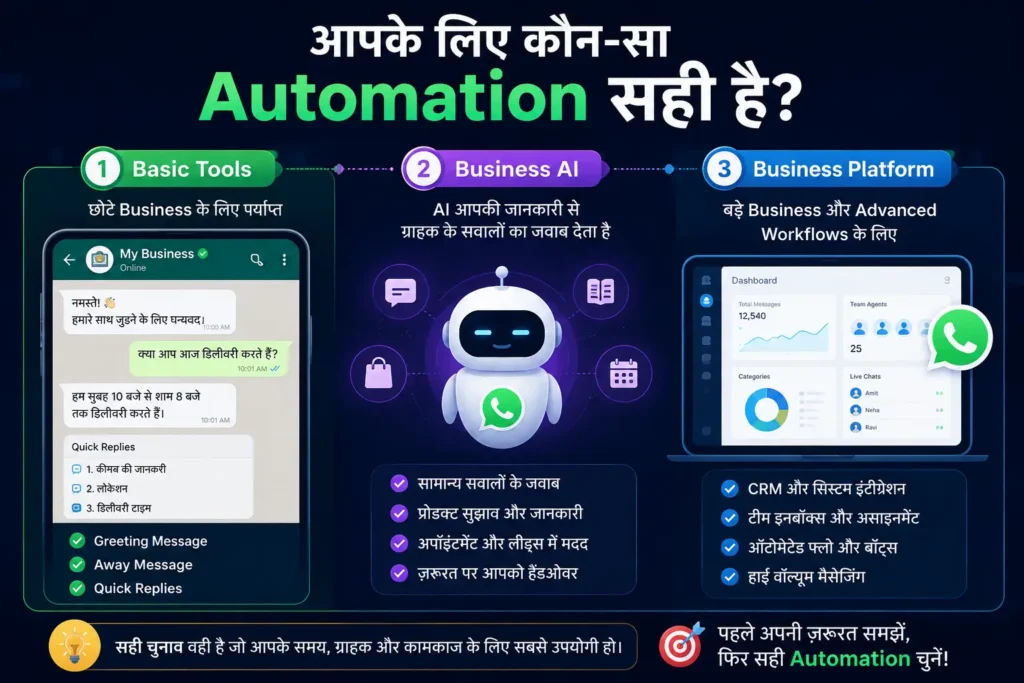
छोटे business के लिए automation तीन स्तरों पर समझी जा सकती है:
Basic automation में Greeting Message, Away Message और Quick Replies जैसे tools आते हैं।
AI-based assistance में Meta Business Agent customer के सवाल के अनुसार business information से जवाब तैयार करने में मदद कर सकता है।
Advanced automation के लिए WhatsApp Business Platform का उपयोग होता है, जहाँ CRM, chatbot, multiple agents और दूसरे systems को जोड़ा जा सकता है।
हर business को तीसरे level तक जाने की जरूरत नहीं होती। सही option वही है जो आपकी वास्तविक enquiries, समय और workflow के अनुसार काम करे।
Level 1: Basic Automation किन businesses के लिए पर्याप्त है?
यदि आपके पास सीमित enquiries आती हैं और आप स्वयं messages देखते हैं, तो WhatsApp Business App के basic tools से ही काफी काम संभाला जा सकता है।
Greeting Message नए customer का स्वागत कर सकता है। Away Message working hours के बाहर reply की expected timing बता सकता है।
Quick Replies price, service process, location या appointment जैसे repeated questions का जवाब जल्दी भेजने में मदद करती हैं।
Greeting Message, Away Message और Quick Replies का complete setup समझने के लिए WhatsApp Business कैसे शुरू करें: Complete Setup Guide पढ़ें।
ये tools fixed instructions पर काम करते हैं। उदाहरण के लिए Quick Reply में जो text आपने save किया है, वही भेजा जाएगा। यह customer के सवाल को समझकर नया जवाब तैयार नहीं करती।
Basic automation आपके लिए पर्याप्त हो सकती है, यदि:
- रोज आने वाली enquiries सीमित हैं
- अधिकतर questions एक जैसे होते हैं
- quotations या orders में human discussion जरूरी है
- आप स्वयं chats regularly check कर सकते हैं
- CRM या complex software जोड़ने की जरूरत नहीं है
Automation की शुरुआत basic tools से करना बेहतर है। केवल नया AI feature उपलब्ध होने के कारण उसे activate करना जरूरी नहीं है।
Meta AI और Meta Business Agent एक जैसे नहीं हैं
Meta AI एक general AI assistant है, जिससे WhatsApp user सामान्य सवाल पूछ सकता है। दूसरी ओर, Meta Business Agent business की तरफ से customers को जवाब देने के लिए बनाया गया है।
Meta Business Agent business profile, Catalog और setup के दौरान दी गई information के आधार पर products, services, prices, delivery या दूसरे common questions का जवाब देने में मदद कर सकता है।
यह product recommendation, appointment booking और incoming leads को समझने जैसे काम भी कर सकता है। Business owner जरूरत पड़ने पर conversation स्वयं संभाल सकता है।
इस अंतर को समझना जरूरी है। Customer का सामान्य Meta AI से chat करना और किसी business के AI Agent से business-related जवाब प्राप्त करना अलग-अलग experiences हैं।
Customer जब पहली बार Meta Business Agent से बात करता है, तो WhatsApp उसे AI assistance के बारे में जानकारी दे सकता है।
Meta Business Agent किसे मिल सकता है?
Meta Business Agent का rollout चरणों में हो रहा है। इसलिए यह मानना सही नहीं होगा कि हर WhatsApp Business account में यह option दिखाई देगा।
Eligible business account में सामान्य path इस तरह दिखाई दे सकता है:
WhatsApp Business → Tools → Your Business AI
उपलब्ध accounts के current setup steps के लिए Meta Business Agent की official setup guide देख सकते हैं।
इसके बाद guided steps के माध्यम से feature setup किया जा सकता है। Menu का नाम app version या rollout के अनुसार बदल सकता है।
Option न दिखाई दे, तो किसी unofficial app या third-party shortcut का उपयोग न करें। App updated रखें और official availability का इंतजार करें।
Feature उपलब्ध होने का मतलब यह भी नहीं है कि उसे तुरंत customers के लिए चालू कर देना चाहिए। पहले business information को व्यवस्थित करना और replies test करना जरूरी है।
क्या आपके business को AI की जरूरत है?
Home bakery, tutor या freelancer को यदि price, timing, delivery और service process से जुड़े समान सवाल बार-बार मिलते हैं, तो AI useful हो सकता है। लेकिन enquiries कम हों या हर customer की जरूरत अलग हो, तो human reply अधिक practical रहेगा।
अपने लिए ये तीन सवाल पूछें:
- क्या बहुत से customers एक जैसे सवाल पूछते हैं?
- क्या late reply के कारण genuine enquiries miss हो रही हैं?
- क्या business information इतनी स्पष्ट है कि AI सही जवाब दे सके?
तीनों का उत्तर “हाँ” हो, तो AI useful हो सकता है। केवल technology नई होने के कारण उसे अपनाना जरूरी नहीं है।
AI Agent चालू करने से पहले information तैयार करें
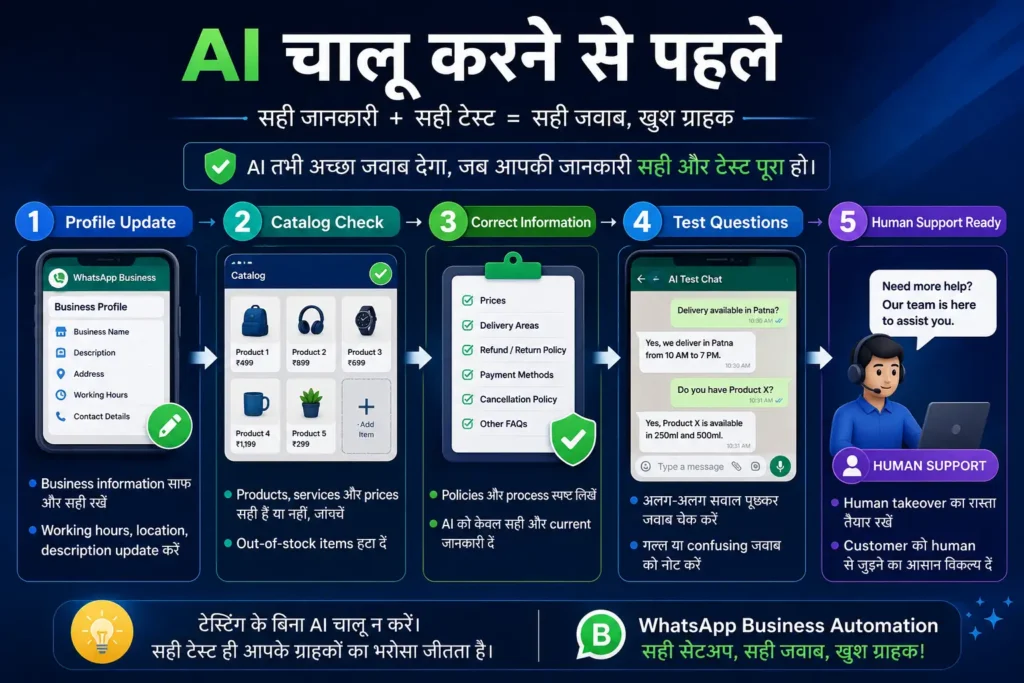
AI उतना ही उपयोगी होगा जितनी सही information उसे मिलेगी। Business Profile अधूरी हो, Catalog में पुराने prices हों या refund conditions स्पष्ट न हों, तो customer को गलत जवाब मिल सकता है।
Setup से पहले इन details को check करें:
- Products और services के सही नाम
- Current prices या price बदलने की conditions
- Working hours
- Delivery या service area
- Appointment process
- Available और unavailable items
- Cancellation और refund conditions
- Human support का तरीका
यहाँ लंबी policy document बनाने की जरूरत नहीं है। सरल, सीधी और current information पर्याप्त है।
उदाहरण के लिए केवल यह लिखना कि “हम पूरे शहर में delivery करते हैं” सही नहीं होगा, यदि delivery केवल कुछ areas में होती है। इसी तरह “refund available है” लिखने के बजाय यह बताना बेहतर है कि refund किन परिस्थितियों में दिया जा सकता है।
AI को ऐसी information न दें जिसे customer के साथ share नहीं किया जाना चाहिए, जैसे passwords, internal pricing calculations, banking credentials या private customer records।
Business Profile और Catalog पहले update करें
Meta Business Agent business द्वारा पहले से Profile और Catalog में जोड़ी गई information का उपयोग करके customers की मदद कर सकता है। इसलिए AI setup से पहले इन दोनों को update करना practical कदम है।
Catalog, payments और customer support का practical workflow समझने के लिए WhatsApp Business Catalog कैसे बनाएं: Payments और Customer Support Guide पढ़ें।
Catalog में discontinued items, गलत prices या unavailable services दिखाई दे रही हों, तो पहले उन्हें ठीक करें। AI को outdated information पर चलाने से customer को तेज लेकिन गलत जवाब मिलेगा, जो late human reply से भी ज्यादा नुकसान कर सकता है।
Business description भी साफ रखें। “हम सभी प्रकार की services देते हैं” जैसे broad statement की जगह स्पष्ट लिखें कि business वास्तव में क्या करता है।
AI Replies को customers के लिए खोलने से पहले test करें
AI का reply अच्छी भाषा में हो सकता है, लेकिन केवल fluent होना पर्याप्त नहीं है। वह factually correct, practical और आपके business के अनुसार होना चाहिए।
Testing के लिए अलग phone या trusted person की मदद से इन situations पर सवाल पूछें:
- सामान्य product या service enquiry
- Current price
- Out-of-stock item
- Delivery area और timing
- Discount request
- Cancellation या refund question
- Payment mismatch
- Human support की मांग
यह भी पूछें कि ऐसा product उपलब्ध है या नहीं, जिसे आपका business बेचता ही नहीं है। सही AI को अनुमान लगाकर product promise करने के बजाय सीमित जानकारी स्वीकार करनी चाहिए या human support की ओर भेजना चाहिए।
हर गलत या confusing reply note करें। Business information update करके दोबारा test करें। एक-दो सही answers देखकर feature को पूरी तरह ready न मानें।
Human Takeover कब जरूरी है?
AI common questions संभाल सकता है, लेकिन हर conversation का final decision उसे नहीं देना चाहिए।
इन situations में human reply बेहतर रहेगा:
- Custom quotation
- Payment mismatch
- Refund या cancellation dispute
- Angry या dissatisfied customer
- Sensitive personal information
- Complicated delivery problem
- ऐसा सवाल जिसका verified answer उपलब्ध न हो
- Customer का human से बात करने का अनुरोध
Meta Business Agent में business owner जरूरत के अनुसार conversation में स्वयं जवाब दे सकता है और Agent के काम करने के तरीके को adjust या बंद कर सकता है।
Customer के लिए human support का रास्ता साफ रखें। जैसे:
“आपकी समस्या के लिए human support जरूरी है। हमारी team working hours में इस chat पर reply करेगी।”
ऐसा message customer को यह समझने में मदद करता है कि उसकी enquiry ignore नहीं हुई है।
AI को pause या बंद कब करना चाहिए?
AI बार-बार गलत price बता रहा हो, unavailable product recommend कर रहा हो या complaints को सही तरीके से handle नहीं कर पा रहा हो, तो उसे चलाते रहना सही नहीं है।
ऐसी स्थिति में:
- AI replies pause करें
- गलत information identify करें
- Business Profile, Catalog या setup details update करें
- दोबारा test करें
- सही results मिलने के बाद ही चालू करें
Official Help Center के अनुसार Meta Business Agent को new chats के लिए pause या delete किया जा सकता है। Exact option app version के अनुसार दिखाई दे सकता है।
Automation का control हमेशा business owner के पास रहना चाहिए।
WhatsApp Business Platform कब जरूरी हो सकता है?
WhatsApp Business Platform साधारण mobile app नहीं है। यह APIs और business messaging tools का system है, जिसे CRM, customer-support software, ecommerce system और advanced chatbot से जोड़ा जा सकता है।
यह तब useful हो सकता है जब:
- Message volume बहुत अधिक हो
- कई agents customer support देते हों
- Order confirmations और shipment updates automate करने हों
- Different enquiries सही team तक भेजनी हों
- CRM में customer conversation track करनी हो
- Backend data से real-time जवाब देने हों
Platform automated flows, smart routing और CRM जैसे systems के साथ integration support करता है। इसे setup करने के लिए technical resources या suitable Business Messaging Partner की आवश्यकता हो सकती है।
एक solopreneur या नया side-hustle केवल advanced दिखने के लिए Platform न चुने। पहले यह देखें कि Business App और Meta Business Agent से समस्या हल हो रही है या नहीं।
WhatsApp Flows क्या है?
WhatsApp Flows advanced Platform feature है, जिसके माध्यम से customer chat छोड़े बिना structured steps पूरे कर सकता है।
उदाहरण के लिए:
- Appointment booking
- Registration
- Lead form
- Service selection
- Feedback collection
यह normal chat reply से अलग है, क्योंकि customer को predefined options और fields मिल सकते हैं। Flows useful हैं, लेकिन छोटे business के लिए तभी जरूरी हैं जब enquiries का process बार-बार एक जैसा हो और manual handling कठिन हो गई हो।
इस article में Flows का technical setup शामिल नहीं है। शुरुआत करने वाले reader के लिए इसका purpose समझना पर्याप्त है।
Third-party Automation Tool चुनते समय सावधानी
कई tools “WhatsApp chatbot”, “unlimited messages” या “full automation” जैसे claims करते हैं। केवल advertisement देखकर subscription न लें।
Provider से साफ पूछें:
- क्या solution official WhatsApp Business Platform पर काम करता है?
- WhatsApp number और account का ownership किसके पास रहेगा?
- Setup और monthly charges क्या हैं?
- Meta messaging charges अलग हैं या शामिल?
- Customer data कहाँ store होगा?
- Service बंद करने पर data export किया जा सकता है?
- Human support उपलब्ध है?
- Cancellation और renewal terms क्या हैं?
ऐसे tool से बचें जो modified app install करने, personal OTP देने या permission के बिना bulk messages भेजने की सलाह देता हो।
Paid automation तभी लें जब वह आपकी वास्तविक problem solve करे। केवल chatbot लगा देना business growth की guarantee नहीं है।
Customer को AI के भरोसे अकेला न छोड़ें
Automation का उद्देश्य customer से दूरी बनाना नहीं, communication को आसान बनाना है।
AI के साथ ये simple practices रखें:
- Customer को गलत promise न दिया जाए
- Promotional messages केवल interested users को भेजे जाएँ
- “Stop” या unsubscribe request का सम्मान किया जाए
- Sensitive details chat में unnecessarily न माँगी जाएँ
- Human support का साफ option मौजूद हो
- Important replies नियमित रूप से review किए जाएँ
WhatsApp Business policy automation के साथ clear human escalation path रखने और customer information को केवल जरूरी messaging purpose के लिए उपयोग करने की अपेक्षा करती है।
Common mistakes जिन्हें रोकना चाहिए
सबसे common mistake है AI को activate करके यह मान लेना कि अब customer support अपने आप संभल जाएगा।
दूसरी गलतियाँ हैं:
- पुराने Catalog और prices के साथ AI चलाना
- Replies test न करना
- हर question का जवाब AI से दिलाना
- Complaint या refund में human support न देना
- Unofficial bulk-messaging tools का उपयोग करना
- Paid tool लेने से पहले ownership और charges verify न करना
- AI के reply को बिना monitoring सही मान लेना
छोटे business के लिए simple setup अक्सर बेहतर होता है। जितनी automation आप आसानी से manage और monitor कर सकें, उतनी ही रखें।
अपने Business के लिए सही Option चुनें
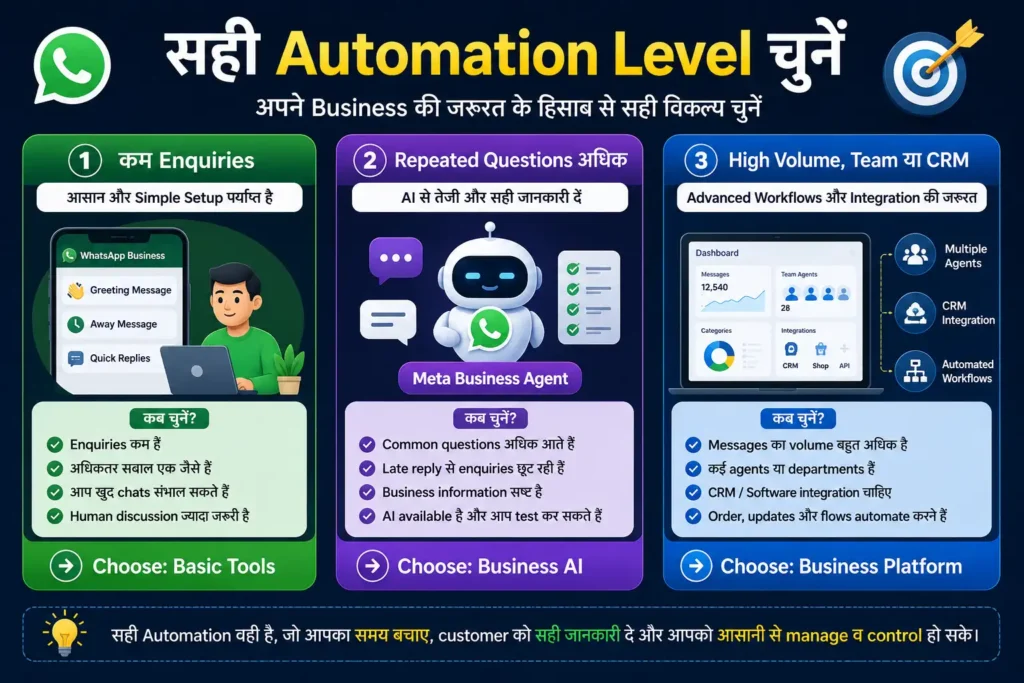
Enquiries कम और questions simple हैं:
Greeting Message, Away Message और Quick Replies से शुरुआत करें।
Common enquiries अधिक हैं और Meta Business Agent उपलब्ध है:
Business information update करें, AI को test करें और human takeover तैयार रखें।
Messages बहुत अधिक हैं, कई agents या CRM की जरूरत है:
WhatsApp Business Platform या verified solution provider पर विचार करें।
सही automation वह नहीं है जिसमें सबसे अधिक features हों। सही automation वह है जो आपका समय बचाए, customer को सही जवाब दे और आपके लिए manage करना आसान रहे।
अक्सर पूछे जाने वाले सवाल
क्या Meta Business Agent सभी WhatsApp Business accounts में उपलब्ध है?
नहीं। इसकी availability account eligibility, app version और rollout पर निर्भर कर सकती है। WhatsApp Business App update करने के बाद भी Your Business AI या AI agent option दिखाई न दे, तो किसी unofficial app या shortcut का उपयोग न करें। Official availability का इंतजार करना बेहतर है।
क्या Meta Business Agent Hindi में customer को जवाब दे सकता है?
Meta ने India में Business AI को भारतीय भाषाओं के support के साथ पेश किया है। फिर भी business-specific terms, product names और mixed Hindi-English questions पर replies अलग हो सकते हैं। इसलिए customers के लिए feature चालू करने से पहले Hindi में common questions पूछकर test जरूर करें।
क्या AI human customer support की जगह ले सकता है?
नहीं। AI सामान्य questions संभाल सकता है, लेकिन quotation, complaint, payment mismatch, cancellation और refund जैसे मामलों में human support जरूरी हो सकता है।
क्या छोटे business को WhatsApp Business Platform या API की जरूरत है?
आमतौर पर नहीं। सीमित enquiries और simple customer communication के लिए WhatsApp Business App के basic tools या उपलब्ध Meta Business Agent पर्याप्त हो सकते हैं। Platform तब consider करें, जब कई agents, CRM integration, automated order updates या अधिक message volume जैसी वास्तविक जरूरत हो।
AI गलत जवाब दे तो क्या करें?
AI replies pause करें, Profile, Catalog या Agent की information ठीक करें और दोबारा testing के बाद ही feature चालू करें।
निष्कर्ष
WhatsApp Business Automation का सही उपयोग वही है, जो business owner का समय बचाए और customer को सही information दे। कम enquiries वाले business के लिए Greeting Message, Away Message और Quick Replies पर्याप्त हो सकते हैं। Common questions अधिक हों और Meta Business Agent उपलब्ध हो, तो उसे accurate business information तथा proper testing के साथ इस्तेमाल किया जा सकता है।
WhatsApp Business Platform जैसे advanced options तभी चुनें, जब message volume, team size या integration की जरूरत वास्तव में बढ़ चुकी हो। सबसे अधिक features वाला system हमेशा सबसे अच्छा नहीं होता। वही setup बेहतर है, जिसे आप आसानी से manage, monitor और जरूरत पड़ने पर control कर सकें।
अब अपने लिए सही Automation Level चुनें
पहले यह देखें कि आपकी समस्या basic tools से हल हो सकती है या नहीं। AI उपलब्ध हो, तो उसे तुरंत सभी customers के लिए चालू करने के बजाय business information update करें, limited testing करें और human support का रास्ता तैयार रखें।
इस guide से जुड़ा कोई practical सवाल या correction हो, तो DigitalBhai Contact Us page के माध्यम से message भेज सकते हैं।
नोट: WhatsApp के AI features, eligibility, menu names और pricing समय के साथ बदल सकते हैं। किसी feature को activate करने से पहले अपने app और official Help Center में current information verify करें।