
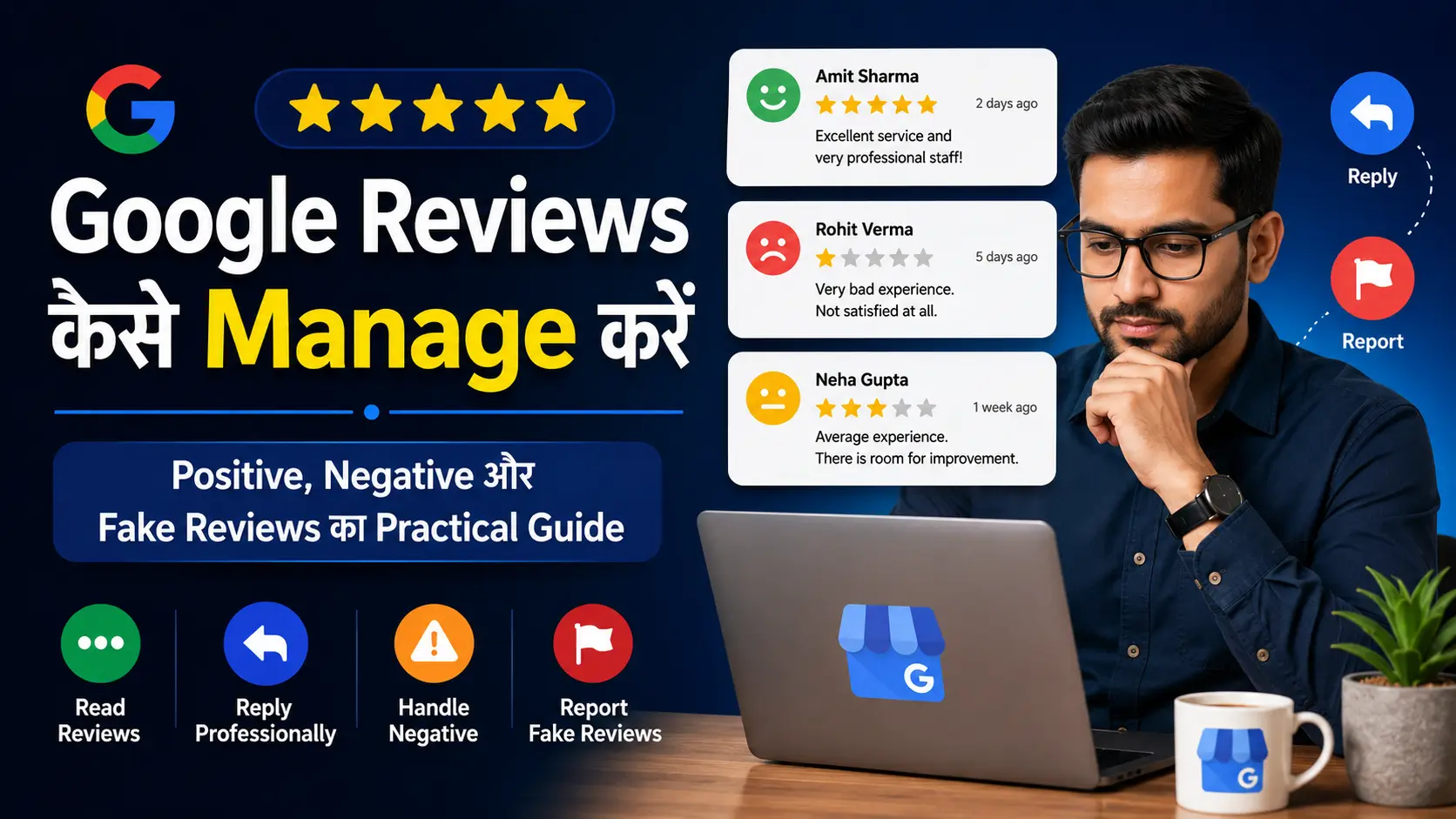
Google Reviews किसी local business के बारे में customers के वास्तविक अनुभव दिखा सकते हैं। एक useful review नए customer को service, behaviour, quality या overall experience समझने में मदद कर सकता है। Verified Google Business Profile का owner reviews पढ़ सकता है और उनका public reply दे सकता है।
लेकिन review management का अर्थ केवल positive reviews पर “Thank you” लिखना या negative reviews को हटाने की कोशिश करना नहीं है।
सही तरीका है—genuine customers से ईमानदार feedback माँगना, हर review का calmly जवाब देना और केवल उन reviews को report करना जो Google की policy का उल्लंघन करते हों।
Google Business Profile review link और QR code उपलब्ध कराता है, जिसे business customers के साथ share कर सकता है।
Review के बदले discount, gift, free product या किसी दूसरे benefit की पेशकश नहीं करनी चाहिए, क्योंकि incentivized reviews policy violation हो सकते हैं।
इस guide में आप समझेंगे कि Google Reviews कैसे Manage करें, customer से review माँगने का सही तरीका क्या है, positive और negative reviews का professional reply कैसे दें, fake या abusive review को कब report करें और कौन-सी practices business Profile के लिए नुकसानदायक हो सकती हैं।
Google Reviews क्या हैं और business के लिए क्यों महत्वपूर्ण हैं?
Google Reviews customers द्वारा दी गई star rating और feedback होते हैं, जो Google Search और Google Maps पर Business Profile के साथ दिखाई दे सकते हैं।
Google Search और Maps पर business information manage करने की पूरी प्रक्रिया के लिए Google Business Profile कैसे बनाएं और Manage करें: Complete Guide पढ़ें।
Review में customer product quality, staff behaviour, delivery, waiting time, cleanliness या overall experience के बारे में लिख सकता है।
Business owner के लिए reviews दो तरह से useful हो सकते हैं:
- नए customers को business का real experience समझने में मदद मिलती है
- Business को service में सुधार की जरूरत पहचानने में मदद मिलती है
Verified Google Business Profile का owner या manager reviews पढ़ सकता है और उनका public reply दे सकता है।
लेकिन review management का उद्देश्य केवल five-star rating बढ़ाना नहीं होना चाहिए। सही उद्देश्य है—genuine feedback लेना, customers को respectful reply देना और जरूरत होने पर service सुधारना।
यह भी याद रखें कि ज्यादा reviews या अच्छी rating business को Google Maps में ऊपर दिखाने की guarantee नहीं देती।
Genuine और Fake Review में क्या अंतर है?
Genuine review किसी वास्तविक customer experience पर आधारित होता है। वह positive, neutral या negative हो सकता है।
उदाहरण:
Service अच्छी थी, लेकिन delivery में उम्मीद से अधिक समय लगा।
यह negative point वाला review है, लेकिन वास्तविक अनुभव पर आधारित होने पर genuine हो सकता है।
Fake या policy-violating review में ये situations हो सकती हैं:
- Reviewer ने business की service इस्तेमाल ही नहीं की
- एक व्यक्ति कई accounts से reviews डाल रहा है
- Review payment, gift या discount के बदले लिखा गया है
- Owner, employee या competitor misleading review दे रहा है
- Review spam, abusive, irrelevant या promotional है
- Rating को artificially बढ़ाने या घटाने की कोशिश की गई है
सबसे जरूरी rule:
हर negative review fake नहीं होता और हर positive review genuine नहीं होता।
Review report करने से पहले यह देखें कि वह वास्तव में Google policy violate करता है या केवल business की आलोचना करता है।
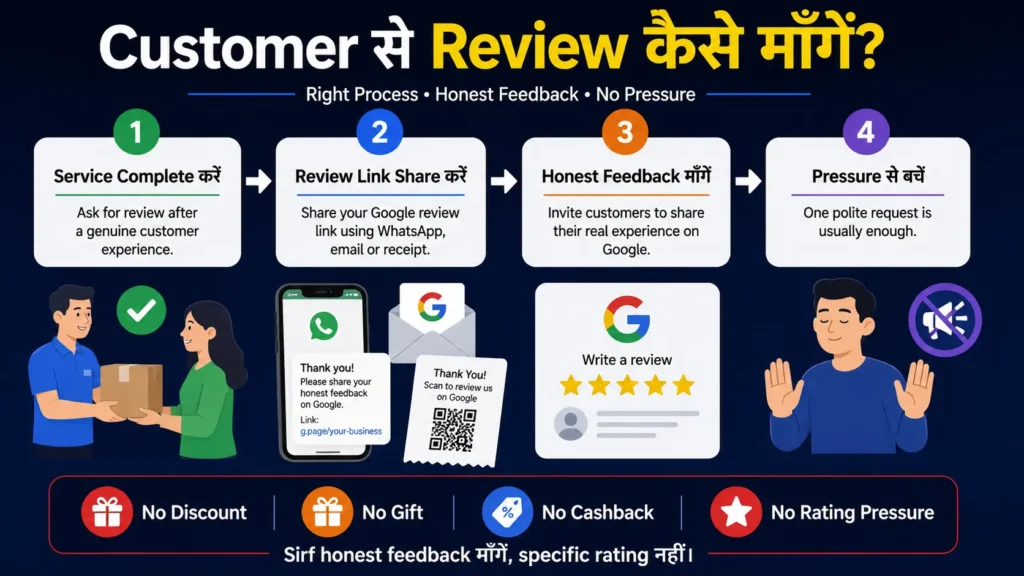
Customer से Google Review कैसे माँगें?
Business genuine customers से honest feedback माँग सकता है। सही समय वह है जब:
- Product deliver हो चुका हो
- Service complete हो गई हो
- Appointment खत्म हो चुका हो
- Customer की problem resolve हो गई हो
Simple message example:
हमारी service इस्तेमाल करने के लिए धन्यवाद। आपके पास समय हो, तो अपने वास्तविक अनुभव के आधार पर Google पर feedback साझा कर सकते हैं।
Customer communication को अलग और professional तरीके से manage करने के लिए WhatsApp Business कैसे शुरू करें: Complete Setup Guide भी पढ़ सकते हैं।
Review request इन माध्यमों से भेजी जा सकती है:
- WhatsApp message
- Thank-you email
- Bill या receipt
- Service completion message
- Website
- Shop या reception पर QR code
लेकिन ऐसा न लिखें:
हमें five-star rating जरूर दें।
Customer से honest feedback माँगें, specific star rating नहीं।
बार-बार reminder भेजने से भी बचें। एक polite request पर्याप्त होती है। जरूरत हो तो बाद में केवल एक final reminder भेजा जा सकता है।
Google Review Link और QR Code कैसे प्राप्त करें?
Google Business Profile से direct review link या QR code प्राप्त किया जा सकता है।
सामान्य process:
- Business Profile वाले Google Account से sign in करें
- Google Search में अपना business name search करें
- Ask for reviews या Get more reviews option खोलें
- Review link copy करें
- उपलब्ध होने पर QR code download करें
- इसे genuine customers के साथ share करें
Menu का exact नाम Google interface के अनुसार थोड़ा बदल सकता है।
QR code print करने से पहले test करें:
- सही Business Profile खुल रही है
- Review लिखने का option आ रहा है
- किसी समान नाम वाले दूसरे business की listing नहीं खुल रही
- QR code आसानी से scan हो रहा है
Official Google option उपलब्ध हो, तो third-party link shortener या QR tool की जरूरत नहीं है।
Positive और Short Review का सही Reply कैसे दें?
Positive review का reply छोटा, natural और review के अनुसार होना चाहिए। हर review पर एक ही copy-paste message न भेजें।
सामान्य Positive Review
अपना अनुभव साझा करने के लिए धन्यवाद। हमें खुशी है कि आपको हमारी service पसंद आई।
Product Quality की तारीफ
Product quality के बारे में feedback देने के लिए धन्यवाद। हमें खुशी है कि आपका experience अच्छा रहा।
Staff Behaviour की तारीफ
हमारी team के behaviour को appreciate करने के लिए धन्यवाद। आपका feedback हम team के साथ जरूर share करेंगे।
केवल Five-Star Rating
Rating देने के लिए धन्यवाद। आपका support हमारे लिए महत्वपूर्ण है।
Short Comment
Feedback साझा करने के लिए धन्यवाद। हमें खुशी है कि आपका अनुभव अच्छा रहा।
Reply में phone number, keywords, offers या promotional paragraph भरने की जरूरत नहीं है।
Neutral या Three-Star Review का क्या जवाब दें?
हर three-star review complaint नहीं होता। कई customers rating दे देते हैं, लेकिन detail नहीं लिखते।
Neutral Review Reply
अपना feedback साझा करने के लिए धन्यवाद। आपकी राय हमारे लिए उपयोगी है और हम customer experience को बेहतर बनाने पर ध्यान देते रहेंगे।
अस्पष्ट Feedback
Feedback देने के लिए धन्यवाद। किसी specific बात में सुधार की जरूरत हो, तो हमारे official contact channel के माध्यम से जानकारी साझा कर सकते हैं।
Customer से public reply में phone number, order number या private details माँगने से बचें। उसे private contact method दें।
Neutral review पर defensive होने या rating explain करने के लिए pressure देने की जरूरत नहीं है।
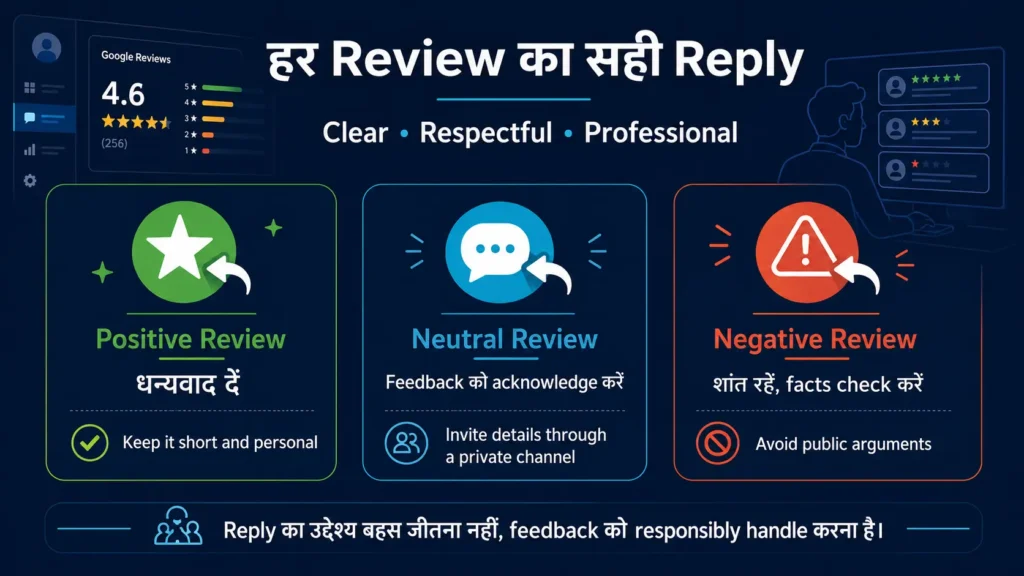
Negative Review को Professionally कैसे Handle करें?
Negative review देखकर तुरंत emotional reply न दें। पहले facts check करें।
देखें:
Customer ने कब service ली
Complaint किस बारे में है
Delivery, payment या appointment का record क्या है
Staff से जुड़ी information उपलब्ध है या नहीं
Problem पहले resolve हुई थी या नहीं
Reply देते समय:
Calm language रखें
Public argument न करें
Customer के experience को acknowledge करें
Sensitive matter private channel में ले जाएँ
गलत promise न करें
Genuine Complaint
आपके अनुभव के बारे में जानकर हमें खेद है। हम इस मामले को समझकर उचित समाधान देना चाहते हैं। कृपया अपनी private details public reply में साझा न करें और हमारे official contact channel से संपर्क करें।
Delay से जुड़ी Complaint
देरी के कारण हुई असुविधा के लिए हमें खेद है। कृपया order details हमारे official support channel पर साझा करें, ताकि हम मामले की जाँच कर सकें।
Business की गलती हो
इस अनुभव के लिए हम क्षमा चाहते हैं। यह हमारी अपेक्षित service standard के अनुसार नहीं था। हमने संबंधित issue को review किया है और सुधार के कदम उठाए जा रहे हैं।
Records Match न करें
Feedback साझा करने के लिए धन्यवाद। हमारे उपलब्ध records में इस experience की पहचान नहीं हो रही है। कृपया official contact channel पर details साझा करें, ताकि हम इसे verify कर सकें।
Negative review का reply बहस जीतने के लिए नहीं, situation को responsibly handle करने के लिए होना चाहिए।
Fake, Spam या Abusive Review कैसे Report करें?
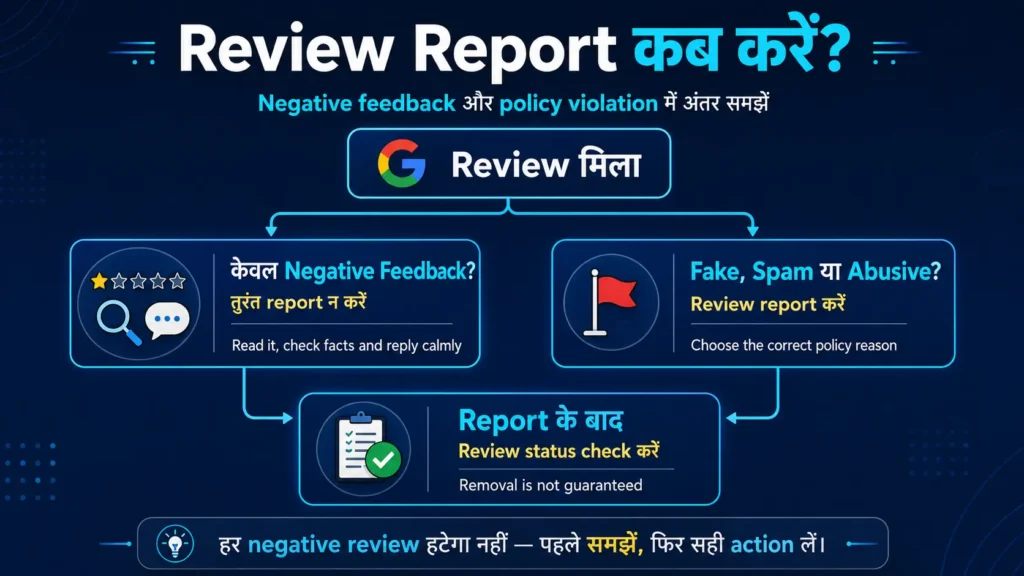
Business owner review को स्वयं delete नहीं कर सकता। वह केवल Google के पास report कर सकता है।
Review report करें, यदि उसमें संभव policy violation हो:
Spam
Fake engagement
Conflict of interest
Abusive content
Personal information
Irrelevant promotion
Business experience से unrelated content
केवल one-star rating या strong criticism removal का कारण नहीं है।
सामान्य reporting process:
Business Profile खोलें
Read reviews पर जाएँ
संबंधित review का menu खोलें
Report review चुनें
सही reason select करें
Request submit करें
Reported review का status Google Review Management Tool में check किया जा सकता है।
यदि Google review को policy-compliant मानता है, तो वह हटाया नहीं जाएगा। कुछ cases में one-time appeal का option मिल सकता है।
Reviewer को publicly fraud, liar या competitor न कहें। इससे situation और खराब हो सकती है।
Reviews से जुड़ी कौन-सी Practices Avoid करनी चाहिए?
इन तरीकों से बचें:
Review के बदले discount देना
Gift, cashback या free service देना
Customer से five-star rating माँगना
Negative review बदलने के बदले benefit देना
केवल happy customers को review link देना
Owner, employee या family से fake review लिखवाना
कई accounts से reviews जोड़ना
Competitor पर fake negative review करना
Bulk reviews खरीदना
Reviewer को धमकी देना
Public reply में private customer information लिखना
सही review request यह है:
अपने वास्तविक अनुभव के आधार पर feedback साझा करें।
गलत request यह है:
Five-star review दें और अगली service पर discount पाएं।
Short-term rating बढ़ाने के लिए गलत तरीके अपनाना business trust और Profile दोनों के लिए नुकसानदायक हो सकता है।
आसान Google Review Management Checklist
Review management के लिए simple routine रखें।
हर सप्ताह
नए reviews check करें
Genuine reviews का reply दें
Complaints को सही person तक पहुँचाएँ
Suspicious review को calmly evaluate करें
Reply देने से पहले
Review पूरा पढ़ें
Available records check करें
Emotional language हटाएँ
Private details public न लिखें
Reply छोटा और relevant रखें
Review माँगते समय
Genuine customers से feedback माँगें
Official review link या QR code share करें
Specific rating का pressure न दें
Incentive न दें
Repeated reminders से बचें
Negative Review पर
Argument न करें
Facts verify करें
Problem acknowledge करें
Private support option दें
Genuine feedback से सीखें
Fake Review पर
सही reporting reason चुनें
Status check करें
Removal की guarantee न मानें
जरूरत हो तो calm public reply दें
Available appeal process देखें
Customer अपना review बाद में edit या delete कर सकता है। Business honest correction की request कर सकता है, लेकिन review बदलने के बदले benefit नहीं दे सकता।
अच्छा review management वह नहीं है जिसमें हर review positive हो। बेहतर system वह है जिसमें business genuine feedback को respectfully संभाले और customers को सही public response दे।
अक्सर पूछे जाने वाले सवाल
क्या business हर customer से Google Review माँग सकता है?
हाँ, genuine customer से उसके वास्तविक अनुभव के आधार पर honest review माँगा जा सकता है। लेकिन किसी specific star rating के लिए pressure नहीं देना चाहिए और review के बदले discount, gift या free service offer नहीं करनी चाहिए।
क्या negative Google Review delete किया जा सकता है?
Business owner review को स्वयं delete नहीं कर सकता। केवल policy violation वाले review को report किया जा सकता है।
Google review को केवल इसलिए नहीं हटाता कि वह negative है या business उससे सहमत नहीं है। Report की स्थिति Review Management Tool में check की जा सकती है।
क्या हर Google Review का reply देना जरूरी है?
हर review का reply अनिवार्य नहीं है, लेकिन important, detailed या complaint वाले reviews का जवाब देना उपयोगी हो सकता है। Reply professional, relevant और छोटा रखें। Google भी clear और concise replies की सलाह देता है।
क्या customer अपना Google Review बदल सकता है?
हाँ। Customer अपने Google Maps review को बाद में edit या delete कर सकता है। Business गलती ठीक होने के बाद customer से honest update की request कर सकता है, लेकिन review बदलने के बदले कोई benefit नहीं दे सकता।
Fake Review report करने के बाद कितने समय में हटता है?
कोई fixed removal time या guarantee नहीं है। Google पहले यह check करता है कि review policy violate करता है या नहीं। इसलिए report करने के बाद status check करें और जरूरत होने पर calm public reply दें।
निष्कर्ष
Google Reviews को manage करने का सही तरीका केवल positive rating बढ़ाना नहीं है। Business को genuine customers से honest feedback माँगना चाहिए, review link या QR code सही तरीके से share करना चाहिए और positive, neutral तथा negative reviews का professional जवाब देना चाहिए।
Negative feedback मिलने पर तुरंत argument करने के बजाय facts check करें। Genuine complaint हो, तो उसे acknowledge करें और sensitive discussion को private support channel में ले जाएँ। Review fake, spam, abusive या policy-violating लगे, तभी Google को report करें।
Discount, gift, cashback या free service के बदले review लेना short-term में attractive लग सकता है, लेकिन यह review integrity और business trust दोनों को नुकसान पहुँचा सकता है।
Better review management वही है जिसमें business feedback को respectfully handle करे और उससे service सुधारने की कोशिश करे।
अब अपना Review Management Process तैयार करें
आज ये चार practical काम करें:
- अपने Google Business Profile का official review link या QR code प्राप्त करें।
- एक छोटा और pressure-free review request message तैयार करें।
- Positive और negative reviews के लिए दो basic reply templates save करें।
- हर सप्ताह नए reviews check करने का simple routine बनाएं।
Google Business Profile बनाना और उसकी basic information manage करना समझने के लिए Google Business Profile कैसे बनाएं और Manage करें: Complete Guide पढ़ें।
इस guide से जुड़ा कोई practical सवाल या correction हो, तो DigitalBhai Contact Us page के माध्यम से message भेज सकते हैं।
नोट: Google Business Profile के menu names, review tools और reporting process समय के साथ बदल सकते हैं। अपने account में दिखाई गई current instructions और official Google Help Center को प्राथमिकता दें।