
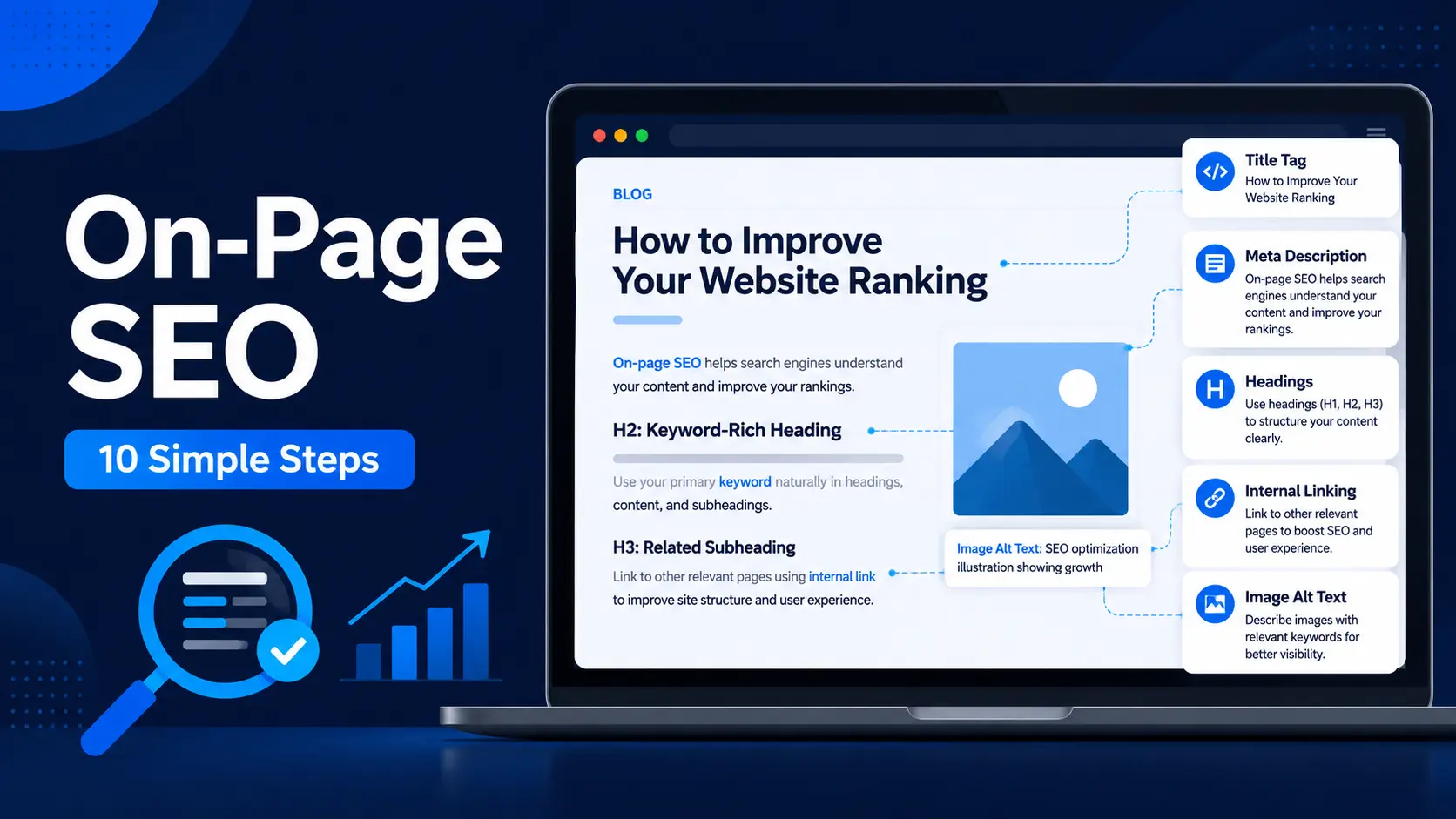
Introduction
Have you ever written a blog post with full effort, but later felt that Google is not understanding your content properly?
This happens with many beginners. They write useful content, but they forget to optimize the title, headings, meta description, images, URL, internal links, and keyword placement.
That is where on-page SEO helps.
Simple words me samjhein, on-page SEO means improving the content and structure of your blog post so that both readers and search engines can understand it better.
On-page SEO is not about tricks or keyword stuffing. It is about making your blog post clear, helpful, well-structured, and easy to read.
In this on-page SEO complete guide for beginners, you will learn 10 simple steps to optimize your blog post before publishing or updating it.
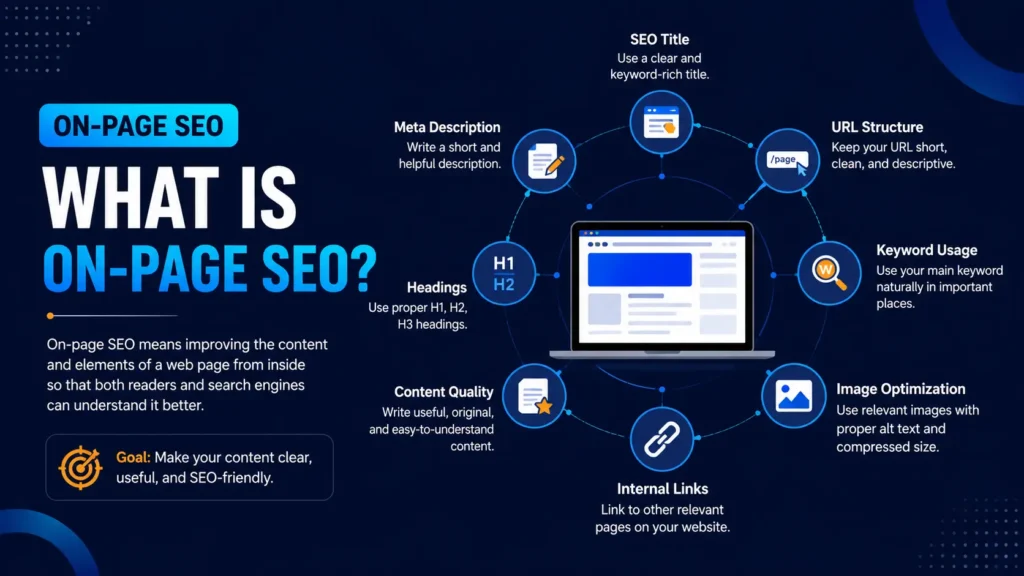
What Is On-Page SEO?
On-page SEO means improving your blog post or web page from inside.
Simple words me samjhein, on-page SEO is the work you do inside your content so that both readers and search engines can understand your page better.
It includes things like:
- SEO title
- Headings
- Meta description
- Main keyword
- Image alt text
- Internal links
- URL structure
- Content quality
- Readability
For example, if your post is about “on-page SEO complete guide for beginners,” then your title, intro, headings, examples, and content should clearly match that topic.
On-page SEO does not mean keyword stuffing. It means making your content clear, useful, organized, and easy to read.
Good on-page SEO can improve your chances of better visibility over time, but it does not guarantee instant ranking.
If you are completely new to SEO, first understand SEO basics for beginners and then come back to this on-page SEO guide.
Why On-Page SEO Is Important
Many beginners think only backlinks matter in SEO. But if on-page SEO is weak, your content may not give clear signals to readers and search engines.
Many beginners write helpful posts, but they forget to organize them properly.
Sometimes the title is unclear, headings are weak, images have no alt text, keywords are not used naturally, and internal links are missing.
Because of this, Google may not clearly understand the page. Readers may also feel confused.
On-page SEO helps you fix these problems.
It helps you:
- Make your blog post easy to understand
- Use keywords naturally
- Improve content structure
- Add useful internal links
- Optimize images
- Improve readability
- Match search intent
- Give Google clearer signals about your topic
For beginner bloggers, on-page SEO is very important because you can control it directly. You do not need paid tools or a big budget to start.
You only need a clear process.
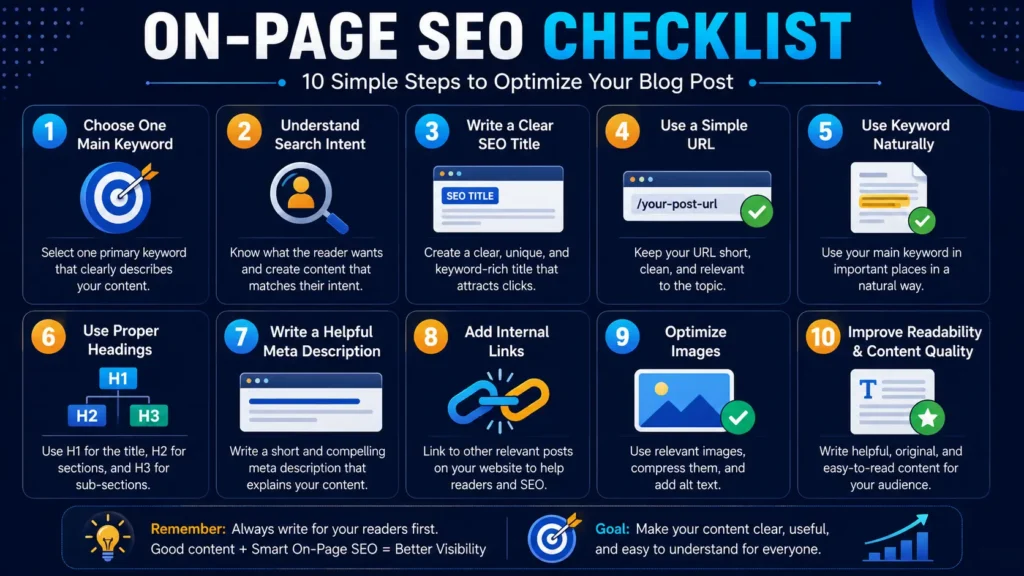
On-Page SEO Complete Guide For Beginners: 10 Simple Steps
Now let’s understand the most important on-page SEO steps one by one.
You can use these steps before publishing a new blog post or while updating an old post.
Step 1: Choose One Main Keyword
Before writing your blog post, choose one main keyword.
Your main keyword should clearly explain the topic of your article.
For example:
- on-page SEO complete guide for beginners
- SEO basics for beginners
- keyword research guide for beginners
- common blogging mistakes beginners make
Do not target too many main keywords in one article. This can make your content confusing.
Choose one main keyword and use related words naturally inside the content.
A good main keyword helps you stay focused while writing.
If you are confused about choosing the right keyword, read this keyword research guide for beginners before writing your next post.
Step 2: Understand Search Intent
Search intent means the real reason behind a search.
Before writing, ask yourself:
What does the reader actually want?
Do they want:
- A simple explanation?
- A step-by-step guide?
- A checklist?
- Examples?
- A solution to a problem?
For example, if someone searches “on-page SEO for beginners,” they probably want a simple guide, not advanced technical theory.
When your content matches search intent, readers are more likely to stay, read, and trust your post.
Step 3: Write a Clear SEO Title
Your SEO title is one of the most important parts of on-page SEO.
It tells readers and search engines what your post is about.
A good SEO title should be:
- Clear
- Helpful
- Related to the main keyword
- Easy to understand
- Not clickbait
- Not too long
Example:
On-Page SEO Complete Guide for Beginners: 10 Simple Steps
This title works because it clearly tells the reader what they will learn.
Avoid confusing or over-promising titles.
Step 4: Use a Simple URL
Your blog post URL should be clean and related to the topic.
Example of a good URL:
on-page-seo-complete-guide-for-beginners
Example of a weak URL:
post-123-seo-random-tips
A clean URL looks professional and helps readers understand the topic before opening the page.
Important note:
If your post is already published and indexed, do not change the URL again and again. URL change karne se SEO issue ho sakta hai if proper redirect is not done.
Step 5: Use The Main Keyword Naturally
After choosing your keyword, use it naturally in important places.
You can use your main keyword in:
- Title
- First paragraph
- One heading, if suitable
- Meta description
- Image alt text
- Conclusion, if natural
But do not repeat the keyword forcefully.
Keyword stuffing makes content robotic and difficult to read.
Simple rule:
Use keywords to guide the content, not to disturb the reader.
Step 6: Use Proper Headings
Headings make your blog post easy to read.
A proper heading structure helps both readers and search engines.
Basic structure:
- H1 for main title
- H2 for main sections
- H3 for smaller points under a section
For example:
H1: On-Page SEO Complete Guide for Beginners
H2: What Is On-Page SEO?
H2: Why On-Page SEO Is Important
H2: 10 Simple On-Page SEO Steps
H3: Step 1, Step 2, Step 3
Good headings help readers scan your post quickly.
They also make your content look clean and organized.
Step 7: Write a Helpful Meta Description
A meta description is a short summary of your blog post.
It can appear in Google search results below your title.
A good meta description should:
- Explain the benefit of the post
- Include the main keyword naturally
- Be short and clear
- Match the content of the page
Example:
Learn on-page SEO for beginners in 10 simple steps. Improve titles, keywords, headings, meta description, internal links, images, and content quality.
Meta description does not guarantee ranking, but it can help users understand your page before clicking.
Step 8: Add Internal Links
Internal links connect one post of your website to another related post.
For example, if you are explaining keywords, you can link to your keyword research guide. If you are explaining SEO basics, you can link to your SEO basics guide.
Internal links help in two ways:
First, they help readers find more useful content.
Second, they help Google understand the relationship between your posts.
But add links only where they make sense. Random links can disturb the reading flow.
Step 9: Optimize Images
Images make your blog post more attractive and easier to understand.
But images should be optimized before uploading.
Check these things:
- Image should be relevant
- File size should be compressed
- File name should be meaningful
- Alt text should be added
- Image should be placed near the related section
Alt text helps search engines and screen readers understand the image.
Example alt text:
on-page SEO checklist for beginners
Avoid alt text like:
image1
screenshot123
photo
Use simple and meaningful alt text.
Step 10: Improve Readability
On-page SEO is not only about keywords. It is also about reader experience.
Your blog post should be easy to read.
Use:
- Short paragraphs
- Simple language
- Clear headings
- Examples
- Bullet points
- Proper spacing
- Useful images
- Natural flow
If your content is difficult to read, visitors may leave quickly.
So always remember:
First write for readers, then optimize for search engines.
Google also gives importance to mobile-friendly sites.
Quick On-Page SEO Checklist Before Publishing
Use this on-page SEO complete guide for beginners as a simple checklist before publishing or updating your next blog post.
- Is the topic clear?
- Is one main keyword selected?
- Is search intent clear?
- Is the title helpful?
- Is the URL clean?
- Is the keyword used naturally?
- Are headings properly used?
- Is meta description written?
- Are internal links added?
- Are images optimized?
- Is alt text added?
- Is the content easy to read?
- Is the post genuinely helpful?
You do not need to make everything perfect from day one.
But if you follow this checklist regularly, your blog posts will become stronger over time.
Common On-Page SEO Mistakes Beginners Should Avoid
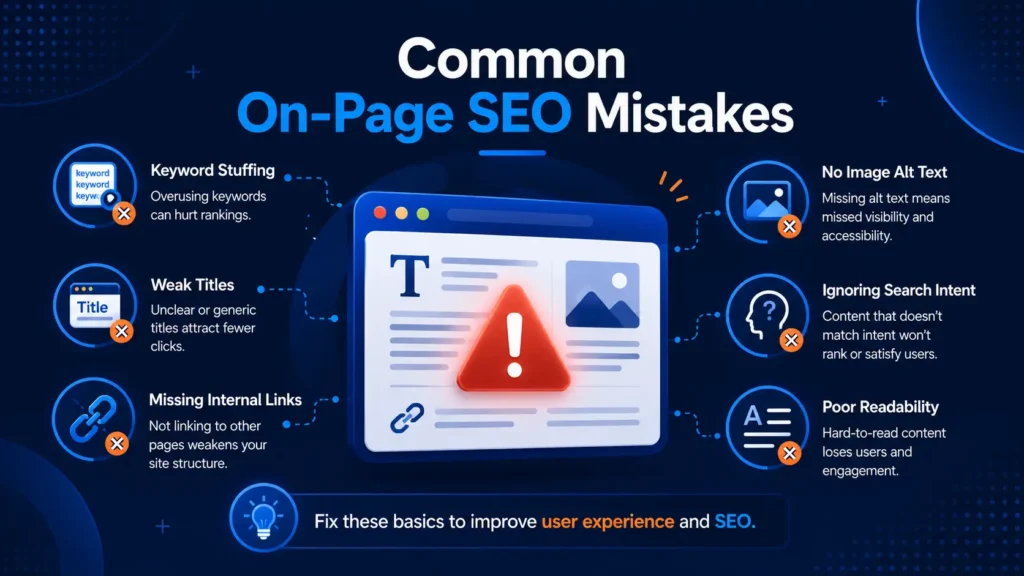
Many beginners make on-page SEO difficult because they focus only on tools and scores.
Here are some common mistakes you should avoid.
Many beginners also make content planning mistakes. You can read common blogging mistakes beginners make to avoid those errors early.
1. Keyword Stuffing
Keyword stuffing means repeating the same keyword too many times.
This makes your content unnatural.
Use keywords naturally. Your content should sound human, not robotic.
2. Ignoring Search Intent
Sometimes beginners choose a keyword but do not understand what the reader actually wants.
If the reader wants a simple beginner guide, do not give them advanced technical theory.
Match your content with the reader’s need.
3. Writing Weak Titles
A weak title does not clearly explain the benefit of the post.
Your title should tell the reader what they will learn.
A clear title improves trust and clickability.
4. Not Using Headings Properly
Without headings, a blog post becomes difficult to scan.
Use H2 and H3 headings to organize your content properly.
Readers should be able to understand your article just by scanning the headings.
5. Missing Internal Links
If you do not add internal links, readers may leave after reading one post.
Internal links guide readers to the next useful article on your website.
They also help build a strong content structure.
6. Ignoring Image Alt Text
Images without alt text are a missed SEO and accessibility opportunity.
Add clear alt text that explains the image naturally.
Do not stuff keywords in every image alt text.
7. Depending Only on Rank Math Score
Rank Math is helpful, but it is not the final judge of content quality.
A green score is good, but reader satisfaction is more important.
Aapka real focus hona chahiye:
Helpful content + clear structure + natural SEO.
8. Publishing Without Final Check
Before publishing, always review your post.
Check:
- Title
- Headings
- Links
- Images
- Meta description
- Formatting
- Spelling
- Readability
Small mistakes can reduce the quality of an otherwise good post.
Simple On-Page SEO Tips For Beginners
Here are some practical tips:
- Write for readers first
- Choose one clear topic
- Use one main keyword naturally
- Keep paragraphs short
- Use helpful examples
- Add internal links
- Optimize images
- Write a clear meta description
- Avoid fake promises
- Update old posts when needed
On-page SEO becomes easier with practice.
Start with one post, improve it step by step, and learn from your results.
You can also use best free SEO tools to check keywords, improve content, and track basic SEO performance.
FAQs About On-Page SEO For Beginners
What is on-page SEO in simple words?
On-page SEO means improving your blog post from inside so that readers and search engines can understand it better. It includes title, headings, keywords, meta description, internal links, images, URL, and content quality.
Why is on-page SEO important for beginners?
On-page SEO is important because beginners can control it directly inside their own blog posts. It helps make content clear, organized, readable, and more useful for readers.
What are the main parts of on-page SEO?
The main parts of on-page SEO are SEO title, meta description, headings, keyword placement, URL structure, image alt text, internal links, readability, and helpful content.
How many keywords should I use in one blog post?
For one blog post, choose one main keyword and use a few related keywords naturally. Do not force too many keywords because it can make your content confusing and robotic.
Is Rank Math score enough for on-page SEO?
No. Rank Math score is helpful, but it is not enough. Your content should also be useful, original, easy to read, and written for real readers.
What is the difference between on-page SEO and off-page SEO?
On-page SEO is the work you do inside your blog post, like title, headings, content, images, and internal links. Off-page SEO is work outside your website, mainly backlinks and trust-building.
Can on-page SEO improve Google ranking?
On-page SEO can improve your chances of better visibility when your content is helpful, well-structured, and matches search intent. But it does not guarantee instant ranking.
Next Step
On-page SEO helps you improve the quality and structure of your blog post. But it works best when your SEO basics, keyword research, content quality, and website health are also strong.
If you are new to SEO, first understand SEO basics for beginners. Then learn keyword research guide for beginners so you can choose better topics before writing.
You can also read Google SEO Starter Guide to understand basic SEO recommendations from Google.
After that, keep improving your blog posts with on-page SEO, technical SEO, internal linking, and helpful content.
After on-page SEO, you should also learn Technical SEO for Beginners and Off-Page SEO and Backlinks Explained Simply for Beginners.
Read next:
- SEO Basics for Beginners
- Keyword Research Guide for Beginners
- Technical SEO for Beginners
- Off-Page SEO and Backlinks Explained Simply for Beginners
- Best Free SEO Tools for Beginners
If you are still building your blog, also read How to Start Blogging and WordPress Setup Guide for Beginners.
Conclusion
This on-page SEO complete guide for beginners will help you check the most important parts of your blog post step by step.
On-Page SEO shuru me thoda confusing lag sakta hai, but simple tareeke se samjhein to ye mainly content ko organized, useful, aur Google-friendly banane ka process hai.
Agar aap beginner ho to ekdum perfect hone ki tension mat lo.
Start with basics:
- Good keywords
- Clear headings
- Helpful content
- Simple structure
- Better readability
Slowly, aapko improvement dikhne lagega.
SEO ek long-term game hai. Consistency aur learning sabse important hai.
Aur yaad rakho:
Google sirf keywords nahi dekhta. Wo ye bhi dekhta hai ki users ko content helpful laga ya nahi.
So focus on helping people first.
Ab apni latest blog post open kariye aur check kariye ki usme On-Page SEO ke kitne points already apply hain.
If you are a beginner and need simple help with blogging, WordPress setup, SEO basics, or blog post improvement, you can connect with Digital Bhai. The goal is to help beginners learn digital skills in a simple and practical way.
Tell me your doubt in comments — main us topic ko bhi simple language me explain karunga.