
Introduction
Have you ever published a blog post and waited for visitors, but almost nobody came?
Many beginners face this problem. They write content, create images, and update their website, but they do not know what is working and what needs improvement.
This is where SEO tools become useful.
The good thing is that you do not need expensive paid tools to start SEO. Many best free SEO tools can help beginners find keywords, check website performance, track traffic, find indexing issues, improve page speed, and understand SEO problems step by step.
But tools are only helpful when you know how to use them properly.
In this guide, you will learn about 10 best free SEO tools for beginners, what each tool does, what you get in the free version, and when you should use it.
By the end, you will also understand which SEO tools you should start with first, so you do not feel confused by too many options.
- Introduction
- What Are SEO Tools?
- Why Are SEO Tools Important?
- 1. Google Search Console
- 2. Google Analytics
- 3. Google Keyword Planner
- 4. Google Trends
- 5. Rank Math SEO
- 6. Ubersuggest
- 7. Ahrefs Webmaster Tools
- 8. Screaming Frog SEO Spider
- 9. PageSpeed Insights
- 10. GTmetrix
- Which Free SEO Tools Should Beginners Start With First?
- Common Mistakes Beginners Make While Using SEO Tools
- Practical Tips for Beginners
- FAQs
- Next Step
- Conclusion
- Which SEO Tool Will You Try First?
What Are SEO Tools?
SEO tools are software, plugins, or online platforms that help you understand and improve your website’s SEO performance.
Simple words me samjhein, SEO tools help you stop guessing.
Without tools, you may not know:
- Which keywords people are searching for
- Whether Google has indexed your pages or not
- Which blog posts are getting impressions
- Which pages are slow
- Which SEO mistakes need fixing
- Which content is performing better
SEO tools give you data.
This data helps you make better decisions for your blog or website.
Think of SEO tools like a GPS for your website. They do not drive the car for you, but they show you the right direction.
Why Are SEO Tools Important?
Many beginners publish blog posts and then wait for traffic.
But without SEO tools, it becomes difficult to understand what is working and what is not.
SEO tools are important because they can help you:
- Find keyword ideas
- Track clicks and impressions
- Understand website traffic
- Check indexing issues
- Improve website speed
- Find technical SEO problems
- Check backlinks and website health
- Improve content step by step
The best part is that beginners do not need paid tools in the beginning.
Free SEO tools are enough to build a strong foundation.
But remember one thing:
SEO tools only provide data and suggestions. They do not guarantee ranking. Your content quality, website structure, user experience, consistency, and patience also matter.
Before using SEO tools deeply, beginners should first understand SEO basics for beginners so they know what each tool is actually helping with.
1. Google Search Console
What Does Google Search Console Do?
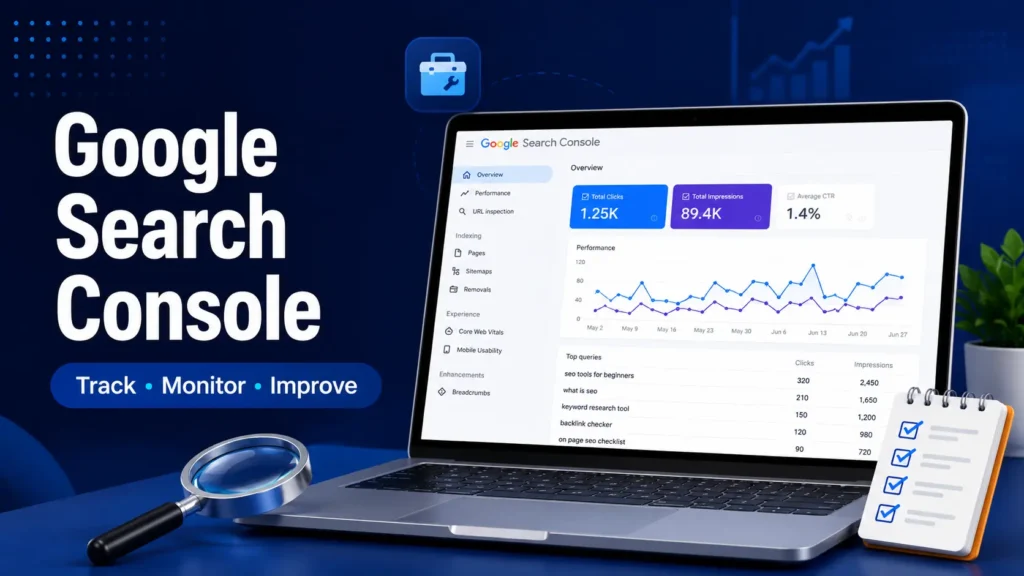
Google Search Console is one of the most important free SEO tools for beginners.
It helps you understand how your website is performing in Google Search.
With Google Search Console, you can see whether Google is discovering your pages, indexing them, and showing them in search results.
What Do You Get for Free?
Google Search Console is completely free.
You can use it to:
- Check impressions
- Check clicks
- Track average position
- Find search queries
- Submit sitemap
- Check indexing status
- Find page experience issues
- Discover SEO problems
How Can Beginners Use It?
If you are a beginner, this should be your first SEO tool.
After connecting your website, check which pages are getting impressions and clicks.
For example, if a post is getting impressions but very few clicks, you may need to improve the title and meta description.
If a page is not indexed, you can inspect the URL and request indexing.
When Should You Use It?
Use Google Search Console at least once a week.
It is useful for checking indexing, search performance, keywords, and early SEO growth.
2. Google Analytics
What Does Google Analytics Do?
Google Analytics helps you understand your website visitors.
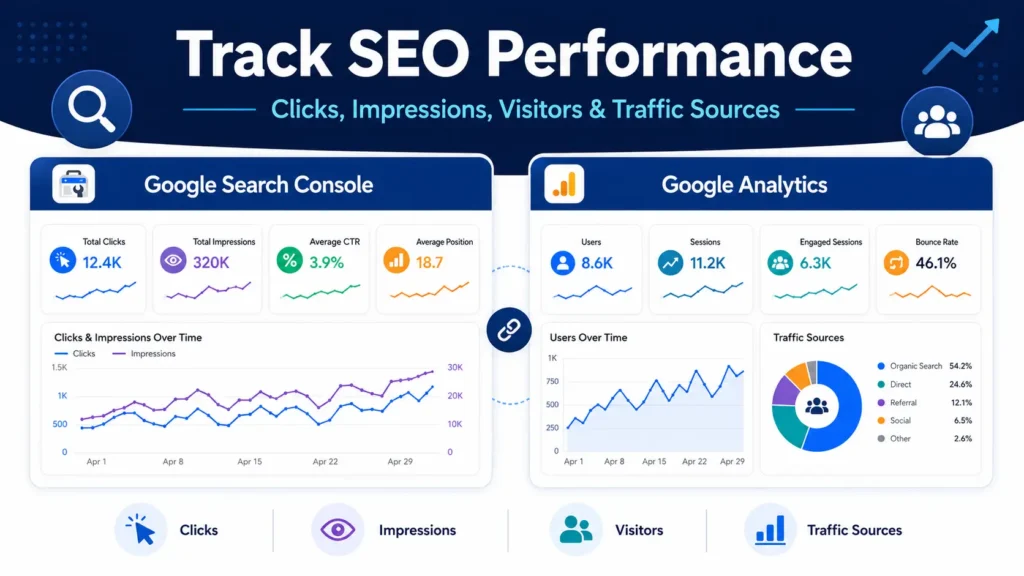
Google Search Console shows how your site performs in Google Search, while Google Analytics shows what visitors do after they come to your website.
It helps you understand user behavior.
What Do You Get for Free?
Google Analytics provides useful data such as:
- Number of users
- Page views
- Traffic sources
- User engagement
- Popular pages
- Visitor location
- Device type
- Basic conversion tracking
How Can Beginners Use It?
Beginners can use Google Analytics to understand which blog posts are getting visitors and how people are using the website.
For example, if one article gets more traffic than others, you can create more helpful content around similar topics.
You can also check whether users are coming from Google, social media, direct visits, or other websites.
When Should You Use It?
Use Google Analytics when you want to understand your audience, traffic sources, and website growth.
It works best when used together with Google Search Console.
3. Google Keyword Planner
What Does Google Keyword Planner Do?
Google Keyword Planner helps you find keyword ideas.
Keyword research is important because it helps you understand what people are searching for before you write a blog post.
This tool is mainly made for Google Ads, but beginners can also use it for SEO keyword ideas.
You can also read the keyword research guide for beginners to understand how to choose better keywords for your blog posts.
What Do You Get for Free?
You can use Google Keyword Planner to:
- Find keyword ideas
- Discover related keywords
- Check search volume range
- Understand competition level
- Find content topic ideas
How Can Beginners Use It?
Suppose you want to write about blogging.
You can search for a broad keyword like:
“blogging”
The tool may show related keyword ideas like:
- how to start blogging
- blogging for beginners
- blogging tips
- start a blog
These keyword ideas can help you choose better blog topics.
When Should You Use It?
Use Google Keyword Planner before writing any blog post.
It helps you avoid writing content on topics that people may not be searching for.
4. Google Trends
What Does Google Trends Do?
Google Trends helps you understand whether a topic is becoming more popular, stable, or less popular over time.
It is useful for checking topic demand and seasonal trends.
What Do You Get for Free?
Google Trends allows you to:
- Compare search topics
- Check topic popularity
- Find rising search terms
- Check regional interest
- Understand seasonal demand
How Can Beginners Use It?
Suppose you are confused between two topics:
- AI tools
- Email marketing
You can compare both in Google Trends and see which topic has stronger search interest.
This helps you choose content topics more wisely.
When Should You Use It?
Use Google Trends when you are choosing blog topics, checking trending subjects, or comparing niche ideas.
It is especially useful before starting content around seasonal or fast-changing topics.

5. Rank Math SEO
What Does Rank Math SEO Do?
Rank Math is a popular WordPress SEO plugin.
It helps beginners optimize blog posts and pages inside WordPress.
It gives SEO suggestions while you write or update your content.
Rank Math becomes more useful when your on-page SEO basics are clear.
What Do You Get in the Free Version?
The free version of Rank Math includes many useful features such as:
- SEO score
- Focus keyword option
- Meta title editing
- Meta description editing
- XML sitemap
- Basic schema options
- Internal link suggestions
- Basic content optimization tips
How Can Beginners Use It?
When you write a blog post, Rank Math gives suggestions like:
- Add focus keyword
- Improve SEO title
- Add meta description
- Use internal links
- Add alt text to images
- Improve content length
These suggestions help beginners follow basic SEO practices.
But do not blindly chase 100/100 score.
A good Rank Math score is useful, but helpful content is more important.
When Should You Use It?
Use Rank Math whenever you publish or update a WordPress blog post.
It works like a basic SEO checklist inside your editor.
6. Ubersuggest
What Does Ubersuggest Do?
Ubersuggest is an SEO tool created by Neil Patel.
It helps with keyword research, content ideas, competitor checking, and basic SEO analysis.
What Do You Get in the Free Version?
The free version has limits, but beginners can still use it for:
- Keyword ideas
- SEO difficulty
- Content ideas
- Competitor overview
- Basic traffic estimates
- Related keyword suggestions
How Can Beginners Use It?
Suppose you want to write about “affiliate marketing.”
You can enter this keyword into Ubersuggest and check related keywords, keyword difficulty, and content ideas.
This can help you understand what type of content people are searching for.
When Should You Use It?
Use Ubersuggest when you want keyword ideas beyond Google Keyword Planner.
It is useful for content planning and beginner-level competitor research.
7. Ahrefs Webmaster Tools
What Does Ahrefs Webmaster Tools Do?
Ahrefs Webmaster Tools helps website owners check SEO health and backlinks.
It is useful when you want to understand technical SEO issues and link-related data.
Ahrefs Webmaster Tools can also help you understand backlinks, which are part of off-page SEO and backlinks.
What Do You Get for Free?
After verifying your website, you can use it to:
- Audit your website
- Find SEO errors
- Check backlinks
- Find broken pages
- Check internal linking issues
- Understand website health
How Can Beginners Use It?
Beginners can use Ahrefs Webmaster Tools to find problems that are not always visible in WordPress.
For example, it can help you find broken links, missing tags, or technical SEO issues.
This is useful when your website starts growing and you have more blog posts.
When Should You Use It?
Use Ahrefs Webmaster Tools once or twice a month.
It is helpful for checking overall website health and backlinks.
8. Screaming Frog SEO Spider
What Does Screaming Frog SEO Spider Do?
Screaming Frog SEO Spider is a website crawler.
It scans your website and helps you find SEO issues across different pages.
What Do You Get in the Free Version?
The free version allows you to crawl up to 500 URLs.
You can check:
- Broken links
- Missing page titles
- Missing meta descriptions
- Duplicate titles
- Redirect issues
- Image alt text issues
- URL problems
How Can Beginners Use It?
If your blog has many posts, checking every page manually becomes difficult.
Screaming Frog can quickly show which pages need improvement.
For example, it can show pages with missing meta descriptions or broken links.
When Should You Use It?
Use Screaming Frog during SEO audits or when you want to check your website structure.
Beginners can start using it after publishing several blog posts.
9. PageSpeed Insights
What Does PageSpeed Insights Do?
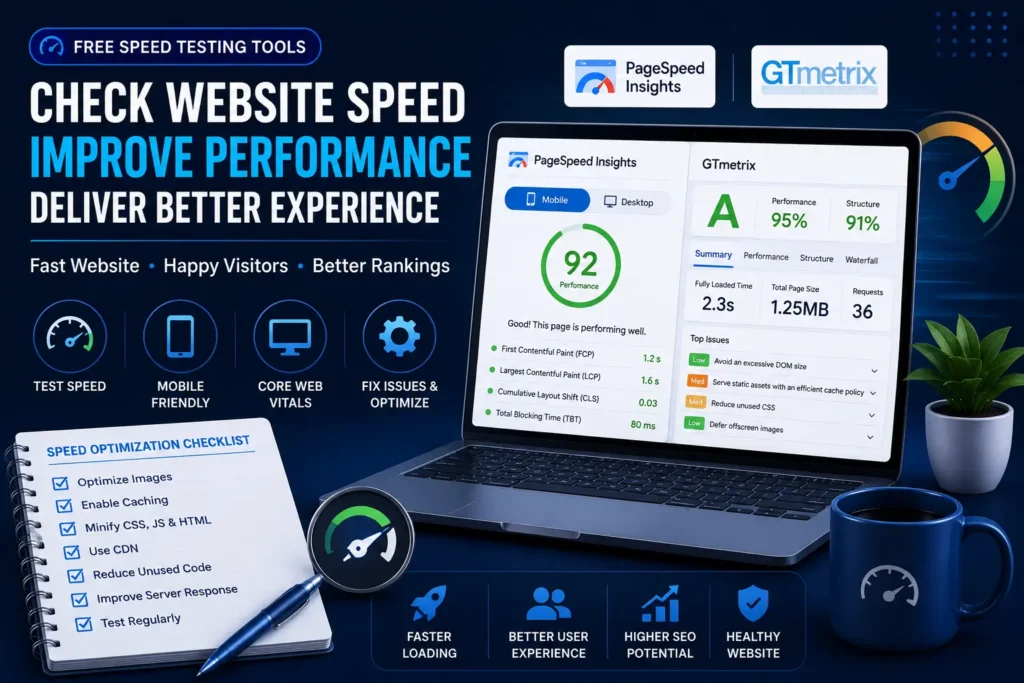
PageSpeed Insights is a free tool from Google that checks website performance.
It shows how your page performs on mobile and desktop.
Website speed matters because slow pages can create a bad user experience.
Website speed is also an important part of technical SEO, so beginners should check it regularly.
What Do You Get for Free?
PageSpeed Insights can help you check:
- Performance score
- Core Web Vitals
- Mobile performance
- Desktop performance
- Loading issues
- Image optimization suggestions
- Technical improvement suggestions
How Can Beginners Use It?
Simply enter your website URL.
The tool will show performance data and suggestions.
For example, it may suggest compressing images, reducing unused code, or improving loading time.
Beginners should not panic if the score is not perfect. Use the suggestions step by step.
When Should You Use It?
Use PageSpeed Insights after publishing important pages or after making major website changes.
It is especially useful if your website feels slow.
10. GTmetrix
What Does GTmetrix Do?
GTmetrix is another website speed and performance testing tool.
It gives detailed reports about page loading and performance issues.
What Do You Get in the Free Version?
GTmetrix can help you:
- Test page speed
- Check loading time
- Analyze performance issues
- View waterfall reports
- Understand which files are slowing your page
How Can Beginners Use It?
GTmetrix helps beginners understand why a page is slow.
For example, it can show if large images, scripts, or files are increasing loading time.
This makes it easier to fix performance issues step by step.
When Should You Use It?
Use GTmetrix along with PageSpeed Insights when you want a deeper speed analysis.
It is useful for website maintenance and performance improvement.
Which Free SEO Tools Should Beginners Start With First?
Beginners do not need to use all tools at the same time.
Too many tools can create confusion.
If you are just starting, begin with these four tools:
1. Google Search Console
Use it to check indexing, clicks, impressions, and search queries.
2. Google Analytics
Use it to understand visitors, traffic sources, and page performance.
3. Rank Math SEO
Use it to optimize your WordPress posts and pages.
4. Google Keyword Planner
Use it to find keyword ideas before writing content.
Once you become comfortable with these tools, you can slowly start using Google Trends, Ubersuggest, Ahrefs Webmaster Tools, Screaming Frog, PageSpeed Insights, and GTmetrix.
Common Mistakes Beginners Make While Using SEO Tools
Many beginners also make planning and content mistakes, so you can read common blogging mistakes beginners make to avoid those errors early.
SEO tools are helpful, but beginners often use them in the wrong way.
Here are some common mistakes to avoid.
1. Chasing Only SEO Scores
A green score in an SEO plugin does not guarantee ranking.
SEO score is helpful, but it is only one part of SEO.
Your content should solve the reader’s problem first.
2. Using Too Many Tools at Once
Beginners sometimes open 8–10 tools and get confused by too much data.
Start with a few important tools and learn them properly.
3. Ignoring Search Intent
Many beginners choose keywords only because they have search volume.
But search intent is more important.
Before writing, ask:
“What does the reader actually want from this keyword?”
4. Not Checking Google Search Console
Google Search Console gives direct search data from Google.
Ignoring it is a big mistake.
Check it regularly to understand which pages are getting impressions, clicks, and indexing issues.
5. Checking Rankings Every Day
SEO takes time.
Daily checking can create stress and confusion.
Instead, check performance weekly or monthly and focus on improving content consistently.
6. Thinking Tools Will Do Everything
SEO tools give data and suggestions.
But they cannot replace helpful content, proper structure, good user experience, and consistent publishing.
Practical Tips for Beginners
If you are new to SEO tools, keep your process simple.
Start with this basic workflow:
- Use Google Keyword Planner to find keyword ideas.
- Use Google Trends to check topic demand.
- Write helpful content for the reader.
- Use Rank Math to optimize title, meta description, headings, and internal links.
- Use Google Search Console to check indexing, impressions, and clicks.
- Use Google Analytics to understand visitor behavior.
- Use PageSpeed Insights or GTmetrix to check website speed.
- Use Ahrefs Webmaster Tools or Screaming Frog when your site grows.
Do not try to master every tool in one day.
First learn the basics. Then slowly improve your process.
SEO tools are not magic buttons. They are helpers.
The real growth comes from useful content, clear structure, regular improvement, and patience.
FAQs
What is the best free SEO tool for beginners?
Google Search Console is one of the best free SEO tools for beginners because it gives direct data from Google. It helps you check clicks, impressions, indexing status, search queries, and page performance.
Can free SEO tools help websites rank?
Free SEO tools can help you understand SEO problems, find keywords, improve content, check website speed, and track performance. But tools alone do not guarantee ranking. Helpful content, proper SEO, consistency, and patience are also important.
Do I need paid SEO tools as a beginner?
No, beginners do not need paid SEO tools in the starting phase. Free tools like Google Search Console, Google Analytics, Rank Math, Google Keyword Planner, Google Trends, and PageSpeed Insights are enough to build a strong SEO foundation.
Which free SEO tool is best for keyword research?
Google Keyword Planner, Google Trends, and Ubersuggest are useful free tools for keyword research. Google Keyword Planner helps you find keyword ideas, Google Trends helps you check topic demand, and Ubersuggest can help with related keyword ideas.
How often should I use SEO tools?
Beginners can check Google Search Console and Google Analytics once a week. You can use keyword research tools before writing a new blog post and speed testing tools after publishing or updating important pages.
Which SEO tool helps improve website speed?
PageSpeed Insights and GTmetrix are useful tools for checking website speed. PageSpeed Insights gives data from Google, while GTmetrix gives a detailed performance report. Both tools can help you understand speed issues step by step.
Are free SEO tools enough for blogging?
Yes, free SEO tools are enough for most beginner bloggers. In the beginning, your focus should be on learning SEO basics, writing helpful content, improving website structure, and tracking performance using free tools.
Next Step
SEO tools are helpful, but they work best when you understand the basic SEO process.
If you are new to SEO, first learn SEO basics for beginners. After that, understand keyword research so you can choose better topics before writing.
Then improve your content with on-page SEO, keep your website healthy with technical SEO, and build trust with off-page SEO and backlinks.
If you are still building your blog, you can also read the WordPress setup guide for beginners and common blogging mistakes beginners make.
Conclusion
Learning SEO can feel overwhelming at first, especially when you hear about expensive software and advanced strategies.
The good news is that you do not need costly tools to get started.
The Best Free SEO Tools can help beginners perform keyword research, monitor rankings, analyze traffic, improve website speed, and fix SEO problems without spending money.
If you are new to SEO, start with Google Search Console, Google Analytics, and Rank Math. As your website grows, gradually explore other tools mentioned in this guide.
The most important thing is not collecting tools. The real goal is using them consistently to improve your website step by step.
If you are a beginner and feel confused about SEO tools, blogging, WordPress setup, or website improvement, you can connect with Digital Bhai. The goal is to help beginners understand digital skills in a simple and practical way.
Which SEO Tool Will You Try First?
Have you used any of these free SEO tools before?
Tell me in the comments which tool you are currently using or which one you want to learn next.
If you found this guide helpful, consider bookmarking it so you can return whenever you need an SEO tool recommendation.
And if you are a beginner blogger, stay connected with DigitalBhai because more simple SEO and blogging guides are coming soon.