
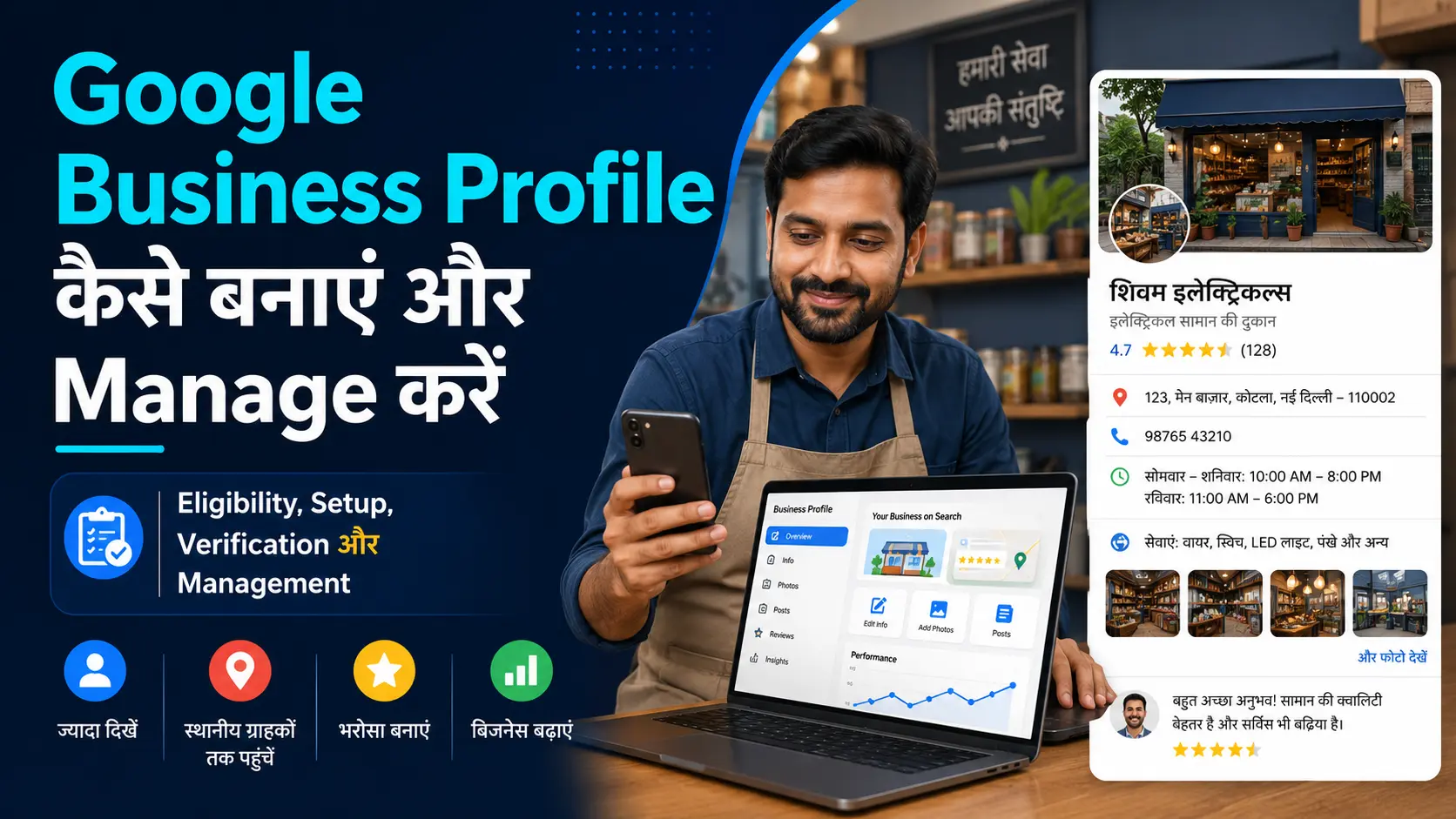
जब कोई customer Google पर किसी दुकान, clinic, restaurant या local service को search करता है, तो उसे business का नाम, location, phone number, working hours, photos और reviews दिखाई दे सकते हैं।
Eligible businesses यह जानकारी Google Business Profile के माध्यम से Google Search और Maps पर manage कर सकते हैं। Profile बनाना free है और इसे Google Search तथा Google Maps से manage किया जा सकता है।
लेकिन Google Business Profile हर website या online business के लिए नहीं है। सामान्य रूप से business को अपने stated working hours के दौरान customers से व्यक्तिगत रूप से मिलना चाहिए।
इसमें physical location पर customers को service देने वाले और customer के location पर जाकर काम करने वाले service-area businesses शामिल हो सकते हैं।
इस guide में आप समझेंगे कि आपका business eligible है या नहीं, पहले से मौजूद Profile को कैसे claim करें, सही business information के साथ नया Profile कैसे बनाएं, verification कैसे पूरा करें और बाद में photos, hours, services तथा reviews को कैसे manage करें। साथ ही उन common mistakes को भी जानेंगे, जिनसे Profile में समस्या आ सकती है।
- 1. Google Business Profile क्या है और यह कैसे काम करता है?
- 2. कौन-से businesses Google Business Profile के लिए eligible हैं?
- 3. पहले से Business Profile मौजूद हो तो क्या करें?
- 4. Profile बनाने से पहले क्या तैयार रखें?
- 5. Google Business Profile कैसे बनाएं?
- 6. सही Business Name, Category और Location कैसे भरें?
- 7. Google Business Profile Verification कैसे करें?
- 8. Verification के बाद Profile को पूरा और Manage कैसे करें?
- 9. Reviews और Team Access को सही तरीके से कैसे संभालें?
- 10. Common Mistakes और आसान Management Checklist
- अक्सर पूछे जाने वाले सवाल
- निष्कर्ष
- अब अपना Google Business Profile तैयार करें
1. Google Business Profile क्या है और यह कैसे काम करता है?
Google Business Profile एक free business listing है, जिसकी मदद से eligible business Google Search और Google Maps पर अपनी जरूरी जानकारी दिखा सकता है।
Online visibility के दूसरे basic तरीकों को समझने के लिए Digital Marketing for Beginners: A Simple Guide to Start पढ़ें।
जब कोई व्यक्ति किसी local business को search करता है, तो उसे Profile में ये details दिखाई दे सकती हैं:
- Business name
- Address या service area
- Phone number
- Website
- Working hours
- Photos और videos
- Products या services
- Customer reviews
- Directions और contact options
उदाहरण के लिए कोई व्यक्ति “bakery near me”, “electrician in Patna” या किसी particular clinic का नाम search करता है, तो Google relevant Business Profiles दिखा सकता है।
Profile बनाने या claim करने के लिए Google कोई सामान्य listing fee नहीं लेता। लेकिन Profile बन जाने का अर्थ यह नहीं है कि business automatically search results में सबसे ऊपर दिखाई देगा। इसकी मुख्य भूमिका customers को सही और current business information उपलब्ध कराना है।
Verified Profile को owner अपने Google Account से Google Search और Google Maps पर manage कर सकता है। इसलिए किसी अलग पुरानी “Google My Business App” को खोजने की जरूरत नहीं है।
2. कौन-से businesses Google Business Profile के लिए eligible हैं?
Google Business Profile बनाने से पहले eligibility समझना जरूरी है। सामान्य नियम यह है कि business को अपने बताए गए working hours के दौरान customers से in-person contact करना चाहिए।
Eligible businesses को तीन आसान प्रकारों में समझ सकते हैं:
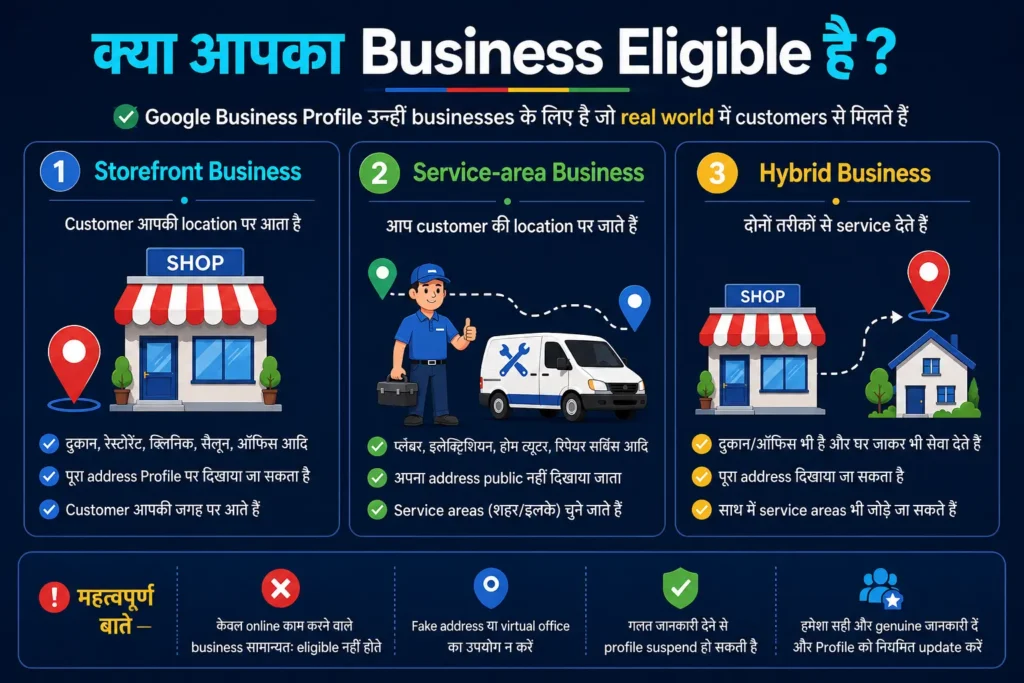
Storefront Business
यह ऐसा business है जहाँ customers किसी physical location पर आते हैं।
उदाहरण:
- दुकान
- Restaurant
- Clinic
- Salon
- Coaching centre
- Repair shop
- Office जहाँ customers मिलते हैं
ऐसे business का address Profile पर दिखाया जा सकता है, बशर्ते location वास्तविक हो और business वहाँ customers को serve करता हो।
Service-area Business
इस प्रकार के business में customers आपके address पर नहीं आते। आप उनके location पर जाकर service देते हैं।
उदाहरण:
- Plumber
- Electrician
- Home cleaning service
- Appliance repair technician
- Home tutor
- Mobile beauty service
ऐसे business को अपना address public नहीं दिखाना चाहिए। वह उन cities, postal codes या areas को service area के रूप में जोड़ सकता है जहाँ वह वास्तव में काम करता है।
Hybrid Business
Hybrid business अपनी physical location पर भी customers को serve करता है और उनके location पर जाकर भी service देता है।
उदाहरण के लिए कोई restaurant dine-in के साथ delivery भी करता है या कोई repair shop workshop और home visit दोनों services देती है।
केवल online काम करने वाला blog, affiliate website, online store, brand, lead-generation website या ऐसा freelancer जो customers से व्यक्तिगत रूप से कभी नहीं मिलता, सामान्यतः eligible नहीं होता। Fake address या केवल verification के लिए rented mailbox का उपयोग करना सही तरीका नहीं है।
3. पहले से Business Profile मौजूद हो तो क्या करें?
नया Profile बनाने से पहले Google Search और Maps में अपने business का नाम, phone number और address search करें।
कई बार Google public information, customer suggestions या पुराने owner द्वारा दी गई details से business listing पहले ही बना देता है। ऐसी स्थिति में दूसरा Profile बनाने से duplicate listing की समस्या हो सकती है।
यदि Profile दिखाई दे और उस पर ownership न ली गई हो, तो Claim this business, Own this business? या इससे मिलता-जुलता option दिखाई दे सकता है। इसके बाद अपने Google Account से claim process शुरू करें।
यदि message आए कि कोई दूसरा व्यक्ति Profile manage कर रहा है, तो तुरंत नया Profile न बनाएं। आप authorized owner होने पर ownership access request भेज सकते हैं। Google इसके लिए current owner को request भेजता है।
Ownership request भेजने से पहले यह check करें:
- क्या Profile उसी business की है?
- Address और phone number match करते हैं?
- कहीं वह किसी दूसरे समान नाम वाले business की listing तो नहीं है?
- क्या किसी पुराने employee या agency ने Profile बनाया था?
Business बंद हो चुका हो, गलत location पर हो या किसी और business का हो, तो claim करने के बजाय Google Maps में सही correction submit करें।
4. Profile बनाने से पहले क्या तैयार रखें?
Setup के दौरान जल्दबाजी करने के बजाय पहले business information तैयार कर लेना बेहतर है। इससे गलत details भरने और बाद में बार-बार changes करने की जरूरत कम होगी।
इन चीजों को पहले check करें:
Business का वास्तविक नाम:
वही नाम रखें जो signboard, invoices, visiting card, website और customers के सामने इस्तेमाल किया जाता है।
Primary category:
Business का मुख्य काम क्या है, यह तय करें। जैसे “Bakery”, “Dental clinic” या “Electrician”।
Business type:
Decide करें कि आपका business Storefront, Service-area या Hybrid है।
Address या service areas:
Physical location पर customers आते हैं तो पूरा सही address रखें। Customers वहाँ नहीं आते तो address hide करके वास्तविक service areas चुनें।
Contact details:
ऐसा phone number दें जिस पर customer वास्तव में संपर्क कर सके। Website हो तो उसका सही URL तैयार रखें।
Working hours:
सामान्य opening और closing time पहले तय करें। छुट्टी के दिन भी सही रखें।
Business proof:
Verification के दौरान signboard, working area, tools, equipment, official documents या management proof की जरूरत पड़ सकती है।
Google Account business owner के control में होना चाहिए। केवल agency या employee के personal account पर Profile बनाना आगे ownership problem पैदा कर सकता है।
5. Google Business Profile कैसे बनाएं?
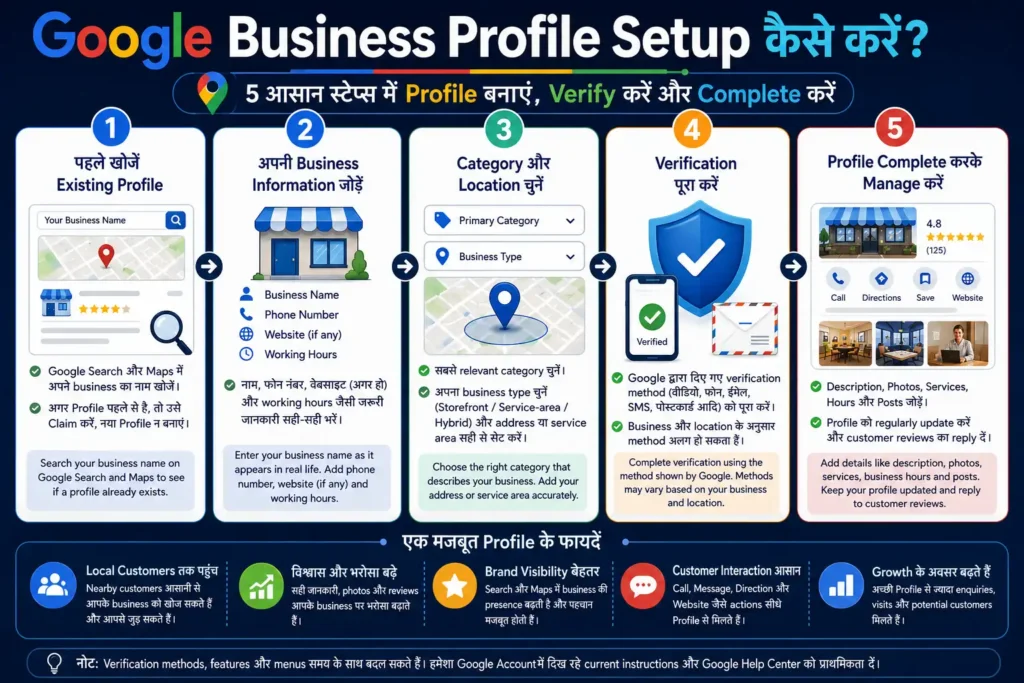
नई Profile बनाने के लिए अपने business वाले Google Account से sign in करें और Google Business Profile के setup page पर जाएँ।
सामान्य process इस प्रकार है:
- Add your business to Google चुनें।
- अपना वास्तविक business name दर्ज करें।
- Google द्वारा सुझाई गई सही business category चुनें।
- बताएं कि customers आपके business address पर आते हैं या नहीं।
- जरूरत के अनुसार address या service area भरें।
- Phone number और website जोड़ें।
- Verification के लिए दिखाई गई instructions follow करें।
- Verification के बाद बाकी Profile information complete करें।
Setup के दौरान Google आपके business name या address से मिलती हुई existing listing दिखा सकता है। Listing आपके business की हो, तो नया Profile बनाने के बजाय उसे select करके claim करें।
हर screen और menu का नाम device, location या Google के current interface के अनुसार थोड़ा अलग दिखाई दे सकता है। लेकिन main information वही रहती है—business identity, category, location, contact details और verification।
Profile बनाते समय ऐसी जानकारी न जोड़ें जिसे आप बाद में prove न कर सकें। केवल Maps पर दिखने के लिए fake location या गलत business type चुनना आगे verification या policy issue पैदा कर सकता है।
6. सही Business Name, Category और Location कैसे भरें?
Profile की सबसे महत्वपूर्ण details business name, category और location हैं। इनमें keyword भरना SEO technique नहीं माना जाना चाहिए।
Business Name
Business name वही लिखें जो वास्तविक दुनिया में इस्तेमाल होता है।
मान लीजिए shop का नाम Sharma Mobile Repair है। तब Profile name में:
Sharma Mobile Repair Best Phone Repair Shop in Patna
लिखना सही नहीं होगा, यदि यह पूरा नाम signboard और branding पर इस्तेमाल नहीं होता।
Google business name को real-world signage, stationery और branding से match करने की सलाह देता है। Verified Profile का नाम बदलने पर दोबारा verification भी माँगी जा सकती है।
Primary Category
वही category चुनें जो sentence पूरा करे:
“यह business एक ______ है।”
यदि business मुख्य रूप से cakes बनाता है, तो “Bakery” सही category हो सकती है। केवल delivery देता है इसलिए random “Delivery service” चुनना जरूरी नहीं है।
सबसे specific relevant category चुनें। हर product या छोटी service के लिए अलग category जोड़ने की जरूरत नहीं है। Google उपलब्ध list से category चुनने देता है; अपनी मनचाही नई category create नहीं की जा सकती।
Address और Service Area
Customers business location पर आते हैं तो precise address और सही map pin रखें।
Customers आपके घर या office पर नहीं आते और आप उनके location पर जाते हैं, तो public address hide करें। केवल Service-area Business को address hide करना चाहिए। Hybrid business address के साथ service area भी जोड़ सकता है।
Service area बहुत बड़ा दिखाने के बजाय केवल वही locations चुनें जहाँ business realistically service दे सकता है।
7. Google Business Profile Verification कैसे करें?
Verification का उद्देश्य यह confirm करना है कि business वास्तविक है और Profile manage करने वाला व्यक्ति उसका owner या authorized representative है।
Verification के available methods हर Profile के लिए एक जैसे नहीं होते। Google business type, available information और दूसरे signals के आधार पर suitable options दिखा सकता है। किसी account में video verification मिल सकता है, जबकि दूसरे में phone, text, email या अन्य available method दिखाई दे सकता है। User हमेशा अपनी पसंद का verification method select नहीं कर सकता।
Video Verification में क्या दिखाना पड़ सकता है?
Video verification में business type के अनुसार तीन तरह की चीजें दिखानी पड़ सकती हैं:
Location proof:
Road, nearby area, building number, storefront या permanent business signage।
Business operation proof:
Products, tools, equipment, working area, branded vehicle या वह सामग्री जिससे business का वास्तविक operation दिखे।
Management proof:
ऐसी जगह या चीज तक access जो सामान्य customer के पास नहीं होगी, जैसे shop का door unlock करना, cash counter, storage area, staff-only section या business documents।
Service-area business storefront न होने पर अपने tools, equipment, branded material, work vehicle और business से संबंधित proof दिखा सकता है। Video में banking information, passwords या customer की private details नहीं दिखानी चाहिए।
Video submit करने से पहले Profile की name, category, address और service area दोबारा check करें। Verification fail हो, तो बार-बार अलग-अलग गलत information डालने के बजाय दिखाई गई reason या official support guidance को समझें।
8. Verification के बाद Profile को पूरा और Manage कैसे करें?
Verification पूरा होने के बाद Profile को अधूरा छोड़ना सही नहीं है। Customers को decision लेने में मदद करने वाली सभी genuine details भरें।
अपने Google Account से Search या Maps पर business खोजकर Edit profile option खोलें। वहाँ से address, hours, contact information, photos और अन्य details update की जा सकती हैं।
Business Hours
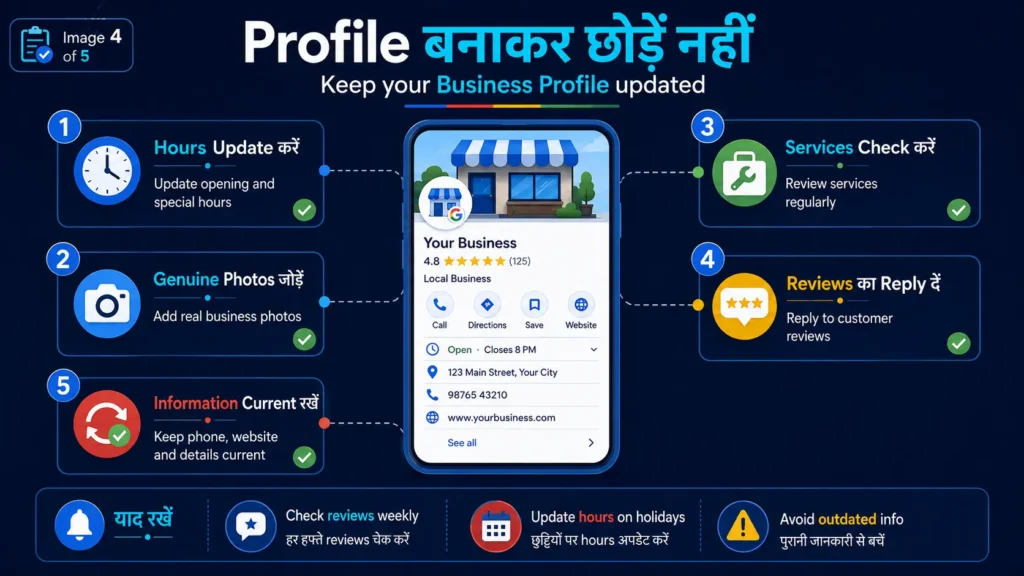
वास्तविक opening और closing hours जोड़ें। Lunch break या split timings हों, तो अलग time entries रखी जा सकती हैं। Festivals, holidays या temporary changes के लिए Special hours का उपयोग करें।
Business Description
छोटे और स्पष्ट paragraph में बताएं:
- Business क्या करता है
- किन मुख्य services या products पर focus है
- किस area को serve करता है
- Customer को कौन-सी practical information जाननी चाहिए
Description में unnecessary keywords, exaggerated claims, offers या misleading statements न भरें।
Business enquiries को अलग और professional तरीके से manage करने के लिए WhatsApp Business कैसे शुरू करें: Complete Setup Guide भी पढ़ सकते हैं।
Products और Services
Available option के अनुसार services के नाम, short description और price information जोड़ सकते हैं। केवल वही service दिखाएँ जो वास्तव में उपलब्ध है।
Photos और Videos
Logo, cover photo, storefront, interior, products, team और work-related genuine images जोड़ें। Exterior photo customers को सही location पहचानने में मदद कर सकती है। Photos Profile पर सामान्यतः verification के बाद दिखाई देती हैं।
Posts और Updates
Business announcements, offers, events या important updates Profile पर post किए जा सकते हैं। लेकिन expired offer और पुरानी information को समय-समय पर check करना चाहिए।
Google Business Profile पर business की genuine photos जोड़ें। Blog या promotional design के लिए बनाई गई illustrative images को वास्तविक storefront या service photo की तरह upload न करें।
9. Reviews और Team Access को सही तरीके से कैसे संभालें?
Reviews customer trust का महत्वपूर्ण हिस्सा हो सकते हैं। Profile verify होने के बाद owner reviews पढ़ सकता है और उनका reply दे सकता है।
Positive review का जवाब देते समय customer को धन्यवाद दें और unnecessary promotional paragraph न लिखें।
Negative review पर गुस्से में बहस करने के बजाय:
- Problem को acknowledge करें
- Customer की private details public reply में न माँगें
- जरूरत हो तो offline contact का तरीका दें
- केवल verified facts के आधार पर जवाब दें
Genuine customers से review माँगना allowed है, लेकिन review के बदले discount, gift या free service offer करना prohibited fake engagement माना जा सकता है।
यदि employee, family member या agency Profile manage करने में मदद करती है, तो Google Account का password share न करें। उन्हें Owner या Manager access दें।
Owner के पास full control होता है। Manager information edit कर सकता है, reviews का जवाब दे सकता है, posts और photos manage कर सकता है, लेकिन कुछ ownership actions नहीं कर सकता।
Access देने का सामान्य path है:
Business Profile → More → Business Profile settings → People and access
हर व्यक्ति अपने Google Account से access करे। काम समाप्त होने पर उसका access remove कर दें।
10. Common Mistakes और आसान Management Checklist
Google Business Profile बनाते समय सबसे बड़ी गलती केवल listing जल्दी publish करने पर focus करना है। गलत information वाला Profile customer को confuse कर सकता है और Google policy issue भी पैदा कर सकता है।
इन mistakes से बचें:
- Online-only business के लिए fake Profile बनाना
- Fake, virtual या mailbox address देना
- पहले से मौजूद Profile का duplicate बनाना
- Business name में city और keywords भरना
- Main business से unrelated category चुनना
- Customer location पर न आने के बावजूद residential address दिखाना
- Verification के लिए गलत documents या misleading information देना
- पुराने phone number और hours छोड़ देना
- Discount देकर reviews लेना
- Agency को permanent owner बनाकर स्वयं access न रखना
- Profile बनाकर कई महीनों तक update न करना
Regular management के लिए यह simple checklist रखें:
हर सप्ताह:
नई reviews और important customer questions check करें।
हर महीने:
Phone number, website, services, photos और description review करें।
Holiday या timing change पर:
Special hours तुरंत update करें।
Business में बड़ा बदलाव होने पर:
Address, category, name या ownership change सोच-समझकर करें, क्योंकि कुछ changes पर दोबारा verification माँगी जा सकती है।
एक अच्छा Google Business Profile वह नहीं है जिसमें सबसे अधिक keywords या photos हों। बेहतर Profile वह है जिसमें customer को business के बारे में सही, स्पष्ट और current information मिले।
अक्सर पूछे जाने वाले सवाल
क्या Google Business Profile बनाना free है?
हाँ। Eligible business Google Business Profile को बिना सामान्य listing fee के बना और manage कर सकता है। लेकिन किसी agency, photographer या third-party tool की service लेने पर उसके अलग charges हो सकते हैं।
क्या online-only business Google Business Profile बना सकता है?
सामान्यतः नहीं। Business को customers से किसी physical location पर मिलना चाहिए या उनके location पर जाकर service देनी चाहिए। केवल blog, affiliate website, online brand या digital store के लिए fake address डालकर Profile बनाना सही नहीं है।
क्या घर से चलने वाला business eligible हो सकता है?
हाँ, यदि business customers को उनके location पर जाकर वास्तविक service देता है। ऐसी स्थिति में residential address public न दिखाकर Service Area रखा जा सकता है। केवल घर से online काम करना अपने-आप eligibility नहीं बनाता।
क्या verification method अपनी पसंद से चुना जा सकता है?
हमेशा नहीं। Google business type और उपलब्ध information के आधार पर verification method दिखाता है। किसी Profile में video verification मिल सकता है, जबकि दूसरे में phone, email या कोई अन्य available option दिखाई दे सकता है।
क्या Google Business Profile बनाते ही business Maps में ऊपर आने लगेगा?
नहीं। Profile बनाना या verify करना top ranking की guarantee नहीं देता। सही category, accurate information, genuine reviews, relevant photos और regular updates Profile को useful बनाते हैं, लेकिन final search visibility Google के systems तय करते हैं।
निष्कर्ष
Google Business Profile local customers को business की सही जानकारी देने का उपयोगी माध्यम है। लेकिन Profile बनाने से पहले यह confirm करना जरूरी है कि business वास्तव में eligible है।
यदि customers आपकी location पर आते हैं, तो सही storefront address और business hours जोड़ें। यदि आप customers के location पर जाकर service देते हैं, तो residential address hide करके वास्तविक service area रखें। केवल Maps पर दिखाई देने के लिए fake address, duplicate listing या business name में unnecessary keywords जोड़ना आगे समस्या पैदा कर सकता है।
Profile create करने के बाद verification पूरा करें और phone number, working hours, services, photos तथा reviews को नियमित रूप से manage करें। बेहतर Profile वही है जो customer को सही, स्पष्ट और current information देता रहे।
अब अपना Google Business Profile तैयार करें
Profile बनाने से पहले ये तीन काम करें:
- Google Search और Maps में business का नाम खोजकर देखें कि कोई Profile पहले से मौजूद तो नहीं है।
- यह confirm करें कि business Storefront, Service-area या Hybrid category में eligible है।
- सही business name, category, address या service area, phone number और working hours तैयार रखें।
इसके बाद official Google Business Profile setup के माध्यम से Profile बनाएं या पहले से मौजूद listing को claim करें।
इस guide से जुड़ा कोई practical सवाल या correction हो, तो DigitalBhai Contact Us page के माध्यम से message भेज सकते हैं।
नोट: Google Business Profile के menus, verification methods और available features business type, location और account के अनुसार बदल सकते हैं। Setup करते समय अपने Google Account में दिखाई गई current instructions और official Google Help Center को प्राथमिकता दें।