
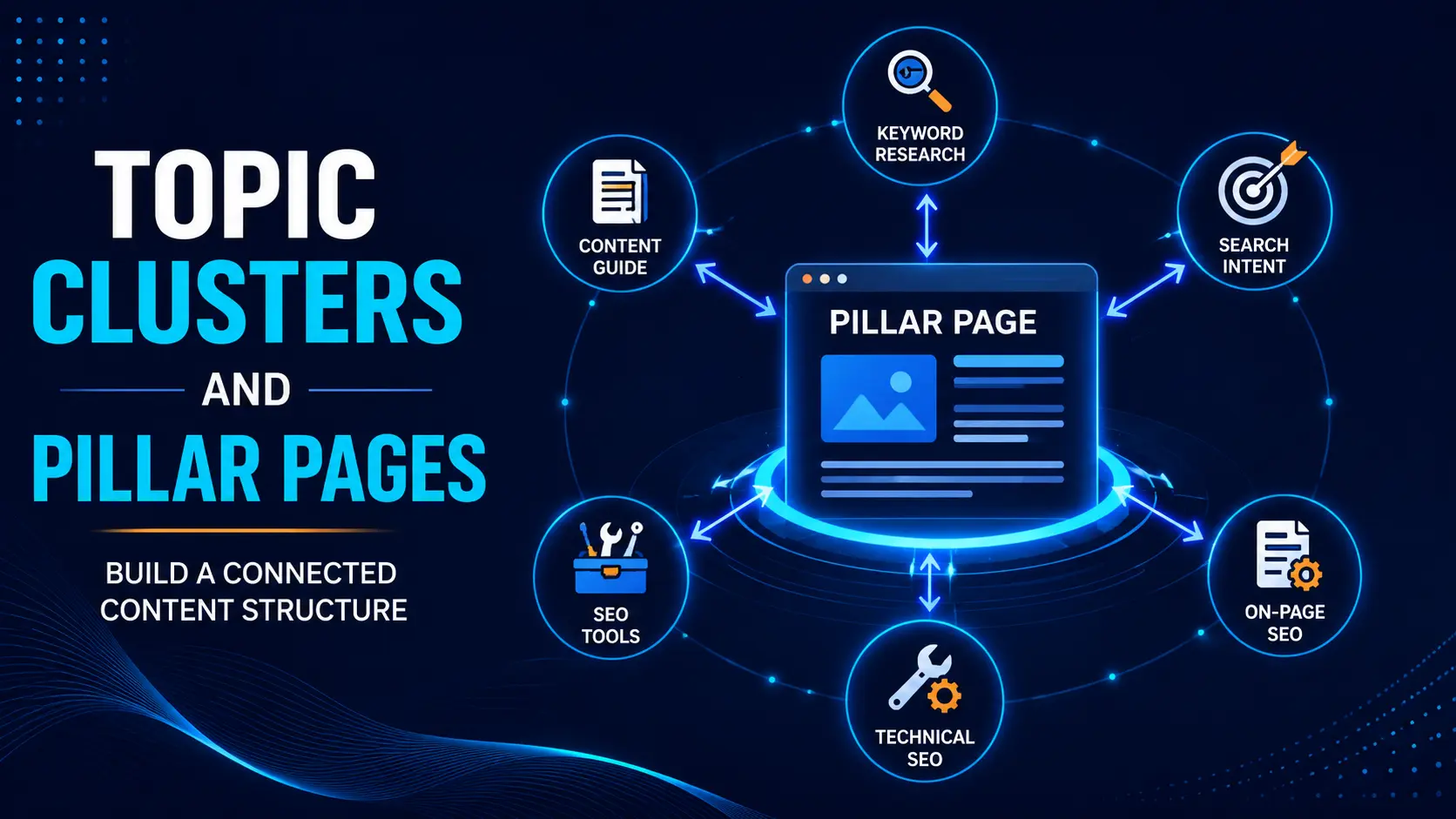
A website may contain several useful articles, but those posts can still feel disconnected when there is no clear structure between them. Readers may find one guide, solve one problem and then leave because the next relevant step is not easy to discover.
Topic clusters and pillar pages help organise related content around a central subject. A broad pillar page introduces the main topic, while supporting posts explain specific questions, processes or problems in greater detail.
For example, an SEO pillar page may connect readers to separate guides about keyword research, search intent, on-page SEO, technical SEO and SEO tools. The purpose is not to create as many internal links as possible. The purpose is to build a logical learning path in which every page has a clear role.
In this practical guide, you will learn how to choose a core topic, select a pillar page, map supporting posts, plan useful internal links and organise existing content into a manageable topic cluster.
सरल शब्दों में, हम scattered blog posts को एक connected content system में बदलना सीखेंगे।
What Are Topic Clusters and Pillar Pages?
A topic cluster is a group of closely related pages built around one broad subject. It usually contains:
- One main pillar page
- Several focused supporting posts
- Relevant internal links connecting the pages
The pillar page gives readers a broad understanding of the topic. Supporting posts provide deeper explanations of individual subtopics.
For example, an SEO basics guide can work as the main pillar page. Separate guides about keyword research, search intent, on-page SEO, technical SEO and off-page SEO can support that pillar.
Publishing several posts about one subject does not automatically create a cluster. The pages need different purposes, clear search intent and useful connections.
Why Does Blog Content Need a Clear Structure?
Many bloggers publish whenever they find an interesting keyword. Over time, the website may contain good content, but related posts remain disconnected, important pages receive few internal links and similar articles begin covering the same intent.
A clear structure helps you decide which page introduces the main topic, which posts explain subtopics and what the reader should explore next. It also makes content gaps, weak pages and unnecessary overlap easier to identify.
Before building clusters, a practical blog content strategy can help you define the audience, content pillars and publishing priorities.
Iska simple matlab hai: blog posts sirf alag-अलग articles nahi rahte. Woh milkar ek connected learning system banate hain.
Pillar Page vs Supporting Post
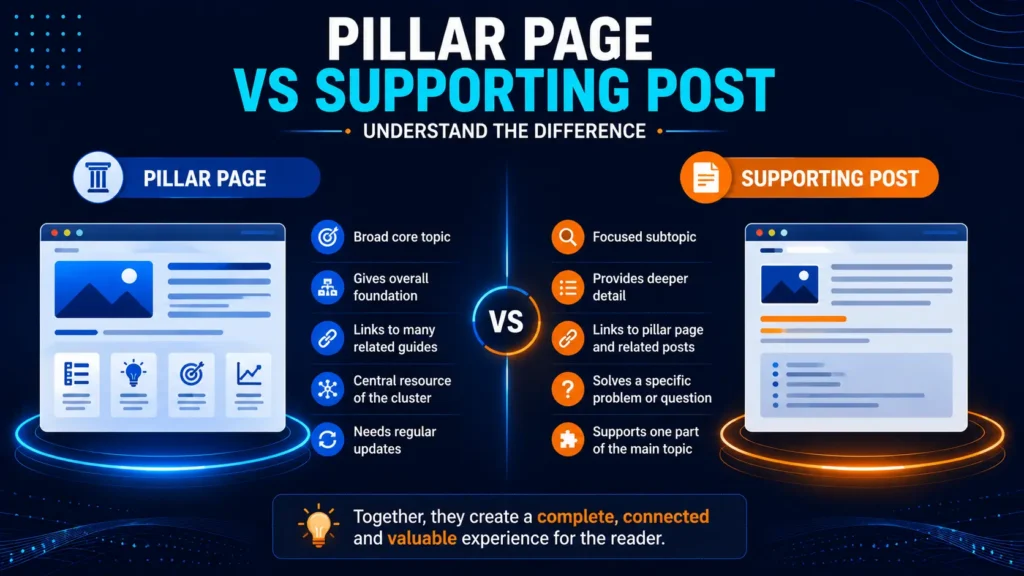
A pillar page is a broad and useful guide built around an important core topic. It introduces the main subject, explains essential subtopics and directs readers to detailed supporting resources.
A pillar page is not automatically the longest post on the website. Its role depends on scope and usefulness, not word count. A moderately sized article can work as a strong pillar page when it covers the complete foundation and connects readers to deeper guides.
A category page is also not automatically a pillar page. A basic category archive may only show post titles, while a pillar page explains the subject, provides context and recommends a logical learning path.
A supporting post has a narrower purpose. It may answer one question, explain one process, compare tools, solve a specific problem or explore one subtopic in detail. It should make sense independently because a reader may discover it directly through Google Search.
The basic difference is simple:
- Pillar page: broad foundation and central resource
- Supporting post: focused detail for one reader need
Both are important. The pillar page gives the big picture, while supporting posts explain the important pieces.
How Do Topic Clusters Work?
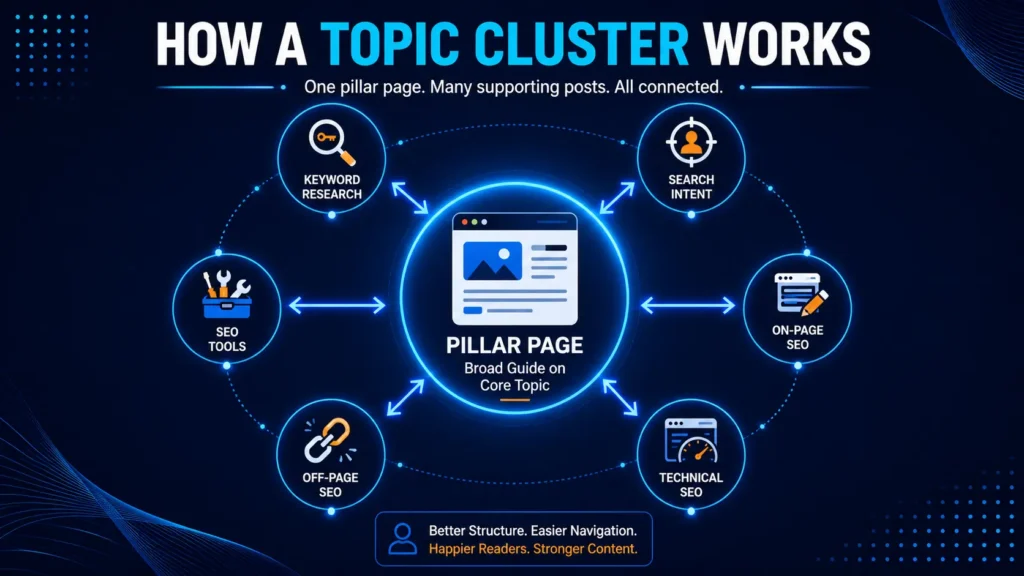
The pillar page links to supporting posts where readers need more detail. Supporting posts link back to the pillar page when the broader explanation is useful. Closely related supporting posts may also link to each other.
For example, a keyword research article may link to a search intent guide because choosing a keyword without understanding the reader’s intent can lead to the wrong content format. That search intent guide may then link to an on-page SEO article.
The goal is not to link every page to every other page. Each link should help the reader understand the topic or take the next logical step.
Main Benefits of Topic Clusters
A well-planned cluster creates a better reader journey. A visitor can move from a broad guide to a tutorial, comparison or problem-solving article without repeatedly searching the website.
It also makes related content easier to discover. Useful posts are less likely to remain hidden or become orphan pages when relevant articles point to them.
Clusters clarify the role of every page. Before writing, you can decide whether the post will be a foundation guide, tutorial, comparison, checklist or tool-related resource. This reduces duplicate content and makes future topic planning easier.
Finally, clusters support more relevant internal linking and simpler updates. When the main topic changes, you can review the pillar page and its supporting content together.
A topic cluster does not guarantee rankings or traffic. It creates a clearer content structure that can help readers and make the website easier to manage.
How to Build a Topic Cluster in 6 Steps
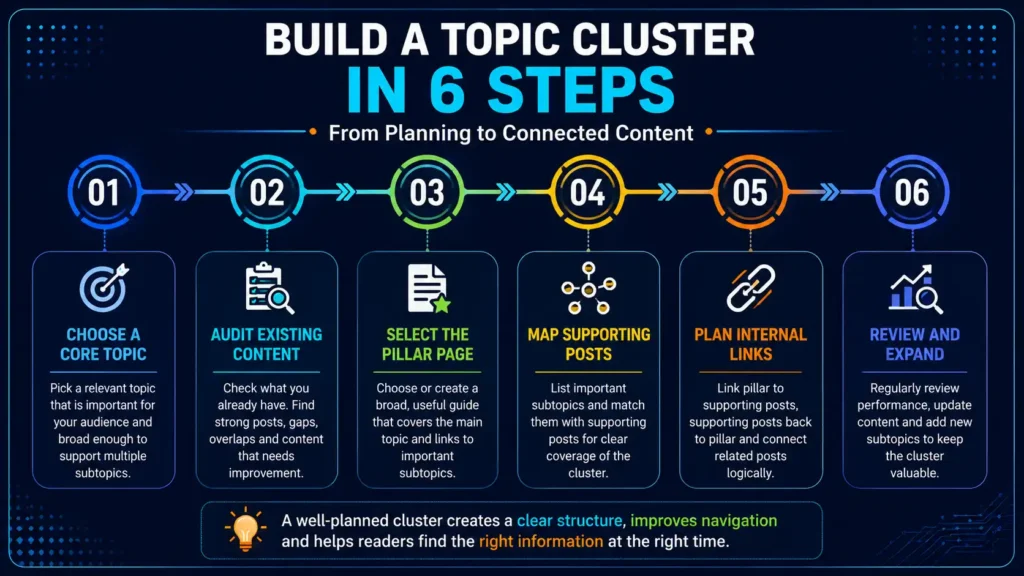
Step 1: Choose a Relevant Core Topic
Choose a subject that matters to your audience and matches the website’s main direction. It should be broad enough to support several useful subtopics but focused enough for your website to cover properly.
SEO, WordPress and blogging can work as core topics. A narrow question such as “How to Add Alt Text to a WordPress Image” is better suited to a supporting post.
Ask whether the subject can support at least five genuinely different questions, processes or problems. Quality matters more than creating a large number of pages.
Step 2: Audit Existing Content
Before creating new posts, list the articles already connected to the core topic. Check their titles, search intent, internal links, current usefulness and possible overlap.
Separate them into four practical groups: strong pages, pages that need improvement, overlapping articles and missing topics.
Strong pages may only need better links. Weak pages may need updated information or clearer structure. Similar pages may need to be differentiated, combined or redirected. Missing questions can be added to the future content plan instead of being published immediately.
Step 3: Select or Create the Pillar Page
An existing article can become the pillar page when it already covers the broad topic, provides a useful foundation and can naturally connect to several supporting guides.
Create a new pillar page only when no current article can perform that role. Avoid creating a duplicate central guide when an existing page can be improved.
Before writing or updating it, define its scope. An SEO pillar page may explain what SEO is, its main types, basic keyword and search intent concepts and performance tracking. Detailed keyword research methods or technical fixes can remain in supporting posts.
Step 4: Map Supporting Posts
List the important subtopics that readers need after understanding the foundation. Each supporting post should solve one clear problem or answer one distinct question.
For an SEO cluster, supporting pages may include:
- Keyword Research for Beginners
- Search Intent Explained
- On-Page SEO Guide
- Technical SEO
- Off-Page SEO
- SEO Tools
- Internal Linking
Connected keywords can represent different reader needs. “What is keyword research?” asks for a definition, while “how to do keyword research” asks for a process and “best free keyword research tools” asks for recommendations.
Before creating separate URLs, decide whether the reader expects a different answer and whether each post can provide enough unique value. If not, one complete article may be better than several repetitive posts.
Also give every page a clear primary role. It may be a foundation guide, tutorial, comparison, mistakes post, checklist, tool guide or earning-connected article. This reduces overlap and makes outlining easier.
Step 5: Plan Internal Links and Publishing Order
A practical cluster normally uses three link directions:
- Pillar page to supporting post
- Supporting post back to the pillar page
- Supporting post to another relevant supporting post
Use descriptive anchor text such as “keyword research guide” or “search intent behind a keyword.” Avoid vague phrases like “click here” and do not force the same exact anchor text every time.
Google’s official link best practices also emphasise clear, relevant and crawlable links.
Internal linking should support the reader journey. Link only when the next page genuinely helps.
You do not need to publish the complete cluster at once. Start with the pillar page or strongest existing guide. Then prioritise the most important beginner problem, an essential process, a common mistakes article and a useful comparison or tool guide.
The correct order depends on audience importance, content gaps, search opportunity, internal-linking value and available time.
Step 6: Review and Expand the Cluster
A cluster can grow gradually. Add a new supporting post when readers repeatedly ask a question, Search Console reveals a relevant query or an important section becomes too detailed for the pillar page.
Before creating another URL, check whether updating an existing article would solve the need better.
Review important clusters every few months. Confirm that the pillar page remains accurate, new posts are connected, links still work and no two pages are covering the same intent.
Practical Topic Cluster Example
Suppose a website teaches blogging to beginners.
The main pillar page could be How to Start Blogging. It may introduce niche selection, WordPress setup, content planning, keyword research, writing and monetization.
Supporting posts may then explain:
- How to choose a blogging niche
- WordPress setup
- Blog content strategy
- Keyword research
- Search intent
- Common blogging mistakes
- How bloggers make money
A reader can begin with the broad blogging guide, move to niche selection, continue to WordPress setup and then learn content strategy and keyword research.
This creates a logical learning journey instead of a random collection of links.
Topic Clusters and Monetization
A cluster can support future monetization, but earning should not be the only reason for building it.
Informational posts can attract relevant visitors, practical guides can build trust and comparisons can help readers make decisions. A cluster may later connect to a checklist, email signup, service, template or honest tool recommendation.
The monetization path should match the reader’s stage. A beginner who is still learning SEO may benefit more from a free guide than an advanced paid tool.
Useful content and trust should come before strong promotion.
Common Topic Cluster Mistakes
A topic that is too broad becomes difficult for a small blog to cover properly, while a topic that is too narrow may not support enough useful subtopics.
Another common mistake is creating several pages for the same intent. Changing a few words in the title does not make the content different.
Do not treat a basic category archive as a complete pillar page, and do not link every article to every other article. Relevance matters more than link quantity.
Thin supporting posts created only for keyword variations can weaken the cluster. Existing pages should be reviewed before new content is added.
Finally, do not build only for search engines. A technically connected cluster is still weak when readers do not receive useful answers or a clear next step.
Practical Topic Cluster Checklist
Before finalising the cluster, confirm:
- The core topic matches the website and audience.
- The pillar page has a clear scope.
- Every supporting post solves a different problem.
- Existing content and overlapping intent have been checked.
- Internal links guide readers naturally.
- Anchor text is clear and readable.
- The publishing plan matches available time.
- The cluster will be reviewed as it grows.
One strong pillar page and a few carefully connected supporting posts can create a useful foundation.
FAQs About Topic Clusters and Pillar Pages
What is the difference between a content pillar and a pillar page?
A content pillar is a broad subject area that the website regularly covers, such as Blogging, WordPress or SEO. A pillar page is one specific central guide built around an important topic within that subject.
A topic cluster includes the pillar page and its related supporting posts.
Can an existing blog post become a pillar page?
Yes. An existing post can become a pillar page when it covers a broad topic, provides a strong foundation and can connect naturally to several supporting articles.
You may need to update its structure, information and internal links, but creating a new page is not always necessary.
How many supporting posts should a topic cluster have?
There is no fixed number. A small cluster may begin with one pillar page and three to five strong supporting posts.
Do not create weak articles only to increase the number of pages. A small, useful cluster is better than a large collection of repetitive content.
Does every supporting post need to link to the pillar page?
It should link to the pillar page when the broader guide genuinely helps the reader. The link should fit naturally, and it does not need the same placement or anchor text in every post.
Supporting articles can also link to each other when the connection provides a useful next step.
Do topic clusters guarantee better Google rankings?
No. Topic clusters do not guarantee rankings, traffic or indexing.
They help organise content, improve navigation and create more relevant internal links. Search performance still depends on content quality, search intent, competition and the overall condition of the website.
Conclusion
Publishing several articles about one subject does not automatically create a useful topic cluster.
The pillar page should provide a broad foundation, while supporting posts should answer focused questions or explain individual processes. Internal links should connect them according to genuine relevance, not link quantity.
You do not need dozens of articles to begin. Start with one important topic, audit the existing content, choose a suitable pillar page and plan a few valuable supporting posts.
As the website grows, add meaningful topics, improve older pages and update the pillar page with new resources.
The goal is to turn disconnected articles into an organised content system that helps readers move naturally from one useful answer to the next.
Build Your First Topic Cluster
Choose one important subject connected to your audience and website direction.
Identify the strongest broad guide, list the related posts already published and note the most important missing questions. Then add relevant links and plan only the next one or two useful additions.
Start with one manageable cluster instead of trying to reorganise the complete website at once.