
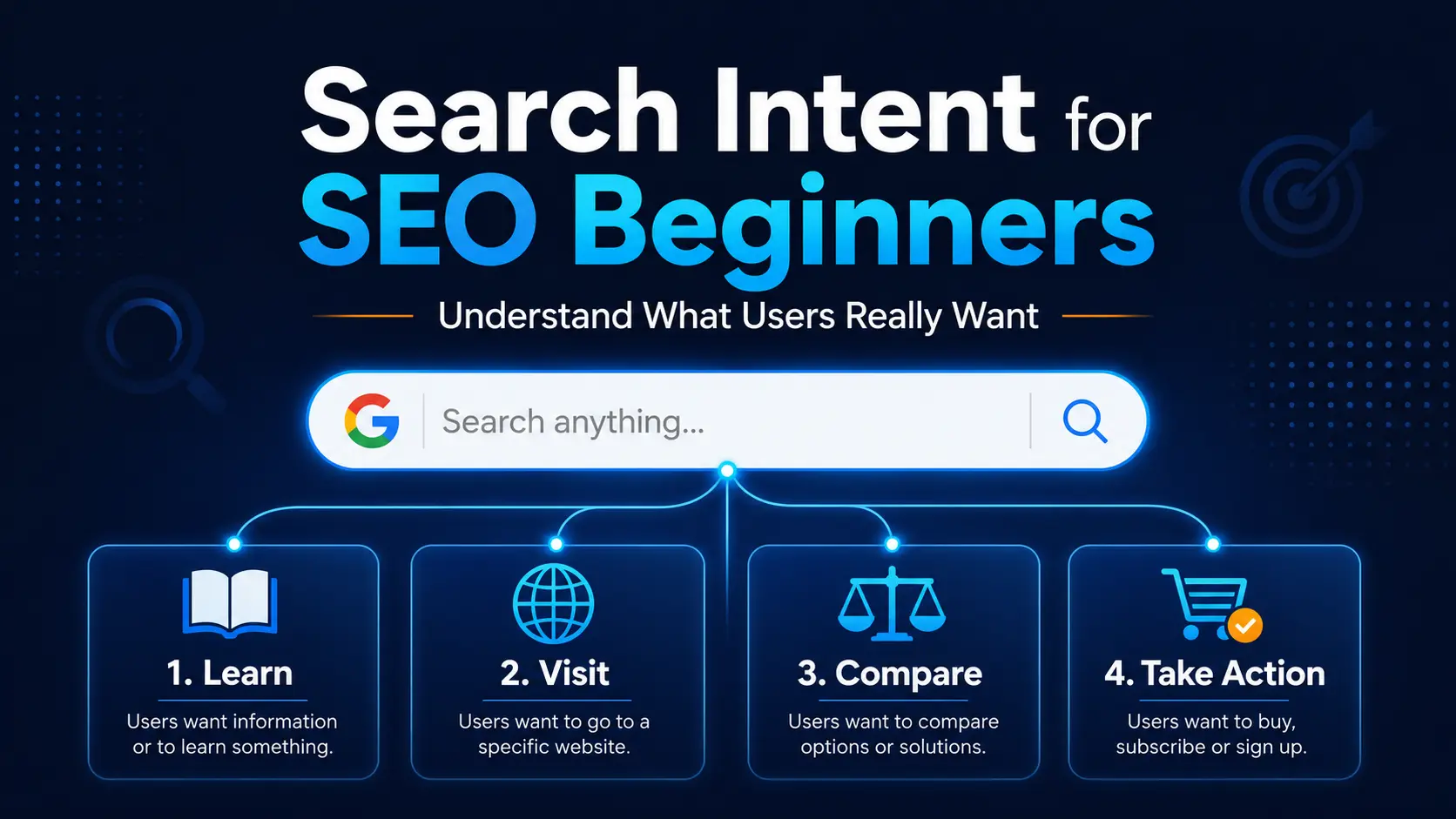
Finding a keyword is only the first step in creating useful SEO content. You also need to understand what the person searching for that keyword actually wants to find.
For example, someone searching for “what is SEO” may want a simple explanation, while someone searching for “best SEO tools” may want to compare different options before choosing one. Even though both searches are related to SEO, the expected content is different.
This purpose behind a search is called search intent. If your content does not match the reader’s intent, even a well-written article may fail to satisfy the visitor.
In this guide on search intent for SEO beginners, you will learn the four common types of search intent, see practical examples and understand how to check Google results before choosing the right content format.
In simple words, we will understand what to actually write after getting the keyword.
- What Is Search Intent?
- Why Search Intent Matters for SEO Beginners
- The 4 Common Types of Search Intent
- 2. Navigational Search Intent
- 3. Commercial Search Intent
- 4. Transactional Search Intent
- How to Identify Search Intent
- How to Choose the Right Content Type
- What Is Mixed Search Intent?
- Common Search Intent Mistakes
- Search Intent and Earning Opportunities
- Practical Search Intent Checklist
- Frequently Asked Questions About Search Intent
- Conclusion
- Start With the Right Keyword and Intent
What Is Search Intent?
Search intent is the main purpose behind a person’s search query. It explains what the user expects to find after entering a word or phrase into Google or another search engine.
For example, a person searching for “how to start a blog” probably wants a step-by-step guide. On the other hand, someone searching for “best web hosting for beginners” may want to compare different hosting options before making a decision.
Both keywords are related to blogging, but the expected content is different.
Search intent helps you understand questions such as:
- Does the user want to learn something?
- Is the user looking for a particular website?
- Does the user want to compare available options?
- Is the user ready to buy, subscribe or take another action?
Simply put, search intent answers this important question:
What does the person actually want when they search for this keyword?
Understanding this purpose can help you create content that is more relevant, clear and useful.
Why Search Intent Matters for SEO Beginners
Finding a keyword does not automatically mean that you should write an article around it. You first need to understand what type of result users expect for that keyword.
If you are still learning how to find suitable keywords, read our Keyword Research Guide for Beginners before analysing their search intent.
If your content format does not match the search intent, the page may struggle to satisfy visitors even when the information is accurate.
It Helps You Create Relevant Content
Search intent gives direction to your content.
For an informational keyword, a detailed guide may be suitable. For a commercial keyword, a comparison post may be more useful. For a transactional keyword, the visitor may expect a product, service or signup page instead of a long educational article.
When the format matches the purpose of the search, readers are more likely to find the page useful.
It Improves the Reader Experience
Visitors usually scan a page quickly to check whether it answers their question.
If someone searches for a simple definition but reaches a page filled only with product promotions, they may leave without reading further. Similarly, a person looking to buy a product may not want to read a long beginner lesson before seeing the available options.
Matching search intent helps readers reach the right information without unnecessary confusion.
It Helps You Choose the Right Content Format
Search intent can help you decide whether to create:
- A how-to guide
- A beginner tutorial
- A list post
- A comparison article
- A product or service page
- A category page
- A tool or template
- A video or visual explanation
The keyword gives you the topic, while search intent helps you choose the best way to present that topic.
It Can Support Traffic and Conversions
Informational content can bring visitors and build trust. Commercial content can help readers compare options. Transactional pages can support enquiries, signups or sales.
This does not mean every article must directly generate income. Different search intents support different stages of the reader journey.
The 4 Common Types of Search Intent
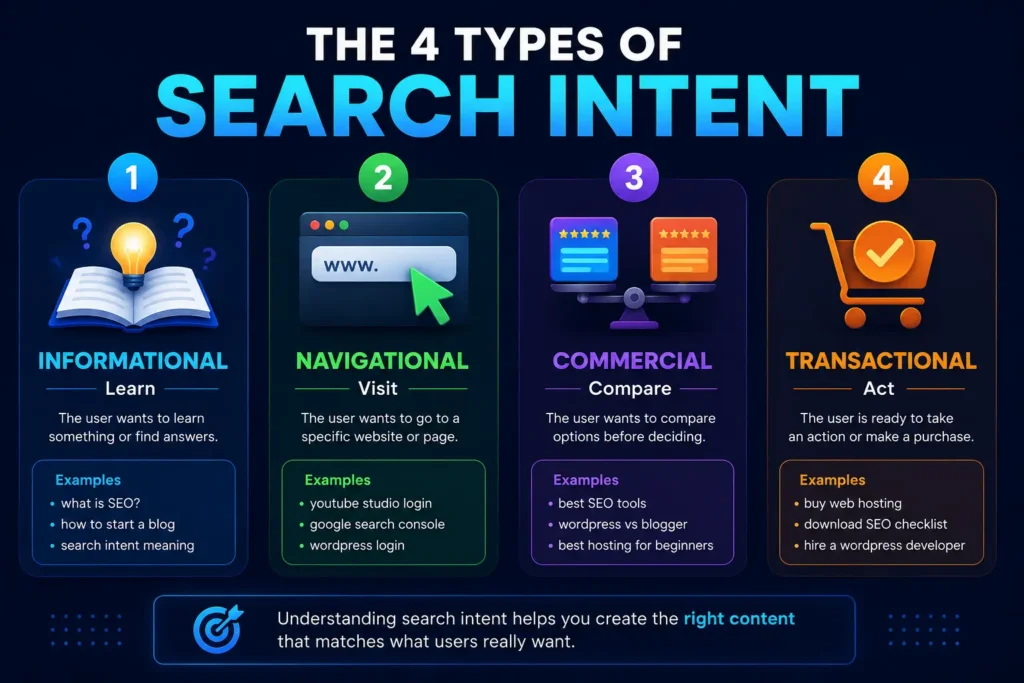
Search intent is commonly divided into four main categories:
- Informational intent
- Navigational intent
- Commercial intent
- Transactional intent
Let us understand each type with simple examples.
1. Informational Search Intent
Informational intent means the user wants to learn something, understand a topic or find an answer.
The person may be looking for a definition, explanation, tutorial, guide or solution to a problem.
Examples of Informational Keywords
Examples of Informational Keywords
- What is SEO?
- How to start blogging
- Search intent meaning
- How does WordPress work?
- On-page SEO checklist
- How to create a website
- Why is my website slow?
These searches do not necessarily show that the person wants to buy something immediately. The main purpose is learning or problem-solving.
Suitable Content Formats
For informational intent, useful formats may include:
- Step-by-step guides
- Beginner tutorials
- Detailed explanations
- Checklists
- FAQs
- Videos
- Troubleshooting articles
For example, a keyword such as “how to install WordPress” should normally lead to a practical setup guide rather than a hosting comparison page.
How Informational Intent Builds Trust
Informational keywords are useful for building traffic, trust and brand awareness. A beginner may discover your website through a simple guide and return later for more advanced information.
2. Navigational Search Intent
Navigational intent means the user wants to reach a specific website, page, brand or online platform.
The person usually already knows where they want to go but uses Google to find it quickly.
Examples of Navigational Keywords
- DigitalBhai
- YouTube Studio login
- Google Search Console
- WordPress login
- Rank Math dashboard
- Hostinger support
In these searches, the user is not asking for a general explanation. They are trying to reach a known destination.
Suitable Content Formats
Navigational searches usually lead to:
- Homepage
- Login page
- Official product page
- Brand page
- Support page
- Specific website section
For example, someone searching for “Google Search Console login” probably wants the official Search Console page, not a long article explaining what Search Console is.
Navigational Intent and Brand Recognition
Navigational searches can become more common as your brand grows. When people begin searching directly for your website or brand name, it can be a positive sign of recognition and trust.
3. Commercial Search Intent
Commercial intent means the user is researching or comparing different options before making a decision.
The person may not be ready to buy immediately, but they are moving closer to a purchase or selection.
Examples of Commercial Keywords
- Best SEO tools for beginners
- WordPress vs Blogger
- Best hosting for a new blog
- Free vs paid keyword research tools
- Rank Math vs Yoast SEO
- Best laptop for blogging
- Top email marketing tools
Words such as best, top, review, comparison, versus and alternatives often indicate commercial research.
However, keyword wording alone is not always enough. You should also check the current search results.
Suitable Content Formats
Commercial intent can be served through:
- Comparison posts
- Product reviews
- Best tools lists
- Alternatives articles
- Pros and cons
- Buying guides
- Feature comparisons
A useful commercial article should help the reader make a better decision. It should not promote a product only because it offers a commission.
Our guide to the best free SEO tools is an example of content that helps beginners explore useful options before choosing a tool.
Commercial Intent and Honest Recommendations
Commercial content can create future affiliate or product opportunities, but trust is essential. Recommendations should be based on relevance, practical value and honest limitations.
4. Transactional Search Intent
Transactional intent means the user is ready, or nearly ready, to take a specific action.
That action may include buying, downloading, booking, subscribing, registering or contacting a service provider.
Examples of Transactional Keywords
- Buy web hosting
- Download SEO checklist
- Register for a blogging course
- Hire WordPress developer
- Start a free trial
- Book a website setup service
- Purchase a domain name
Words such as buy, download, hire, book, subscribe, order and sign up often indicate transactional intent.
Suitable Content Formats
Transactional intent may require:
- Product page
- Service page
- Pricing page
- Signup page
- Download page
- Contact or booking page
- Checkout page
For example, someone searching for “hire a WordPress website designer” probably wants to see services, pricing, experience and a contact option.
A general article explaining WordPress may not satisfy that need.
Transactional Intent and Conversions
Transactional keywords are closer to an action or conversion, but they can also be competitive. A clear offer, honest information and strong trust signals are important.
How to Identify Search Intent
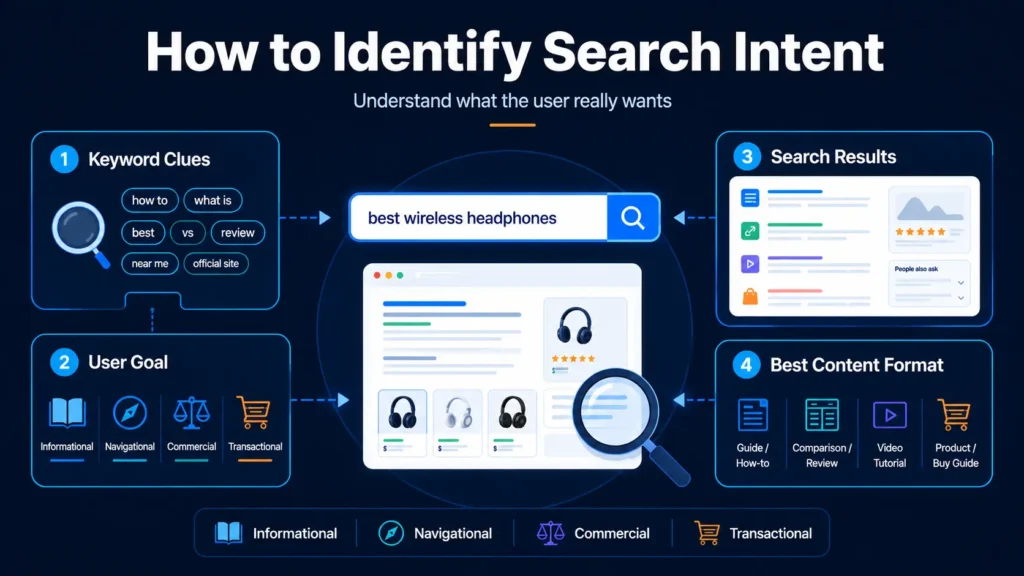
You do not need an expensive SEO tool to understand basic search intent. A simple manual process can give you useful clues.
Step 1: Study the Keyword Wording
Start by reading the keyword carefully.
Some words provide an early indication of the intent.
Informational Signals
- What
- Why
- How
- Guide
- Tutorial
- Meaning
- Checklist
- Tips
Commercial Signals
- Best
- Top
- Review
- Comparison
- Versus
- Alternatives
- Affordable
Transactional Signals
- Buy
- Download
- Hire
- Book
- Subscribe
- Register
- Order
Navigational keywords often include a brand, website or product name.
These signals are useful, but they should not be your only method.
Step 2: Search the Keyword on Google
Enter the keyword into Google and observe the first page of results.
Check what types of pages appear most often:
- Detailed guides
- Short definitions
- Videos
- Product pages
- Category pages
- Comparison posts
- Local business results
- Tools or calculators
The dominant result type often shows what Google believes users commonly expect.
For example, if most results for a keyword are comparison articles, publishing a basic definition post may not match the main intent.
You can also explore the official Google Search Central resources to understand how Google Search works and follow basic SEO guidance
Step 3: Check the Content Format
Look beyond the topic and study the format of the ranking pages.
Ask:
- Are the results step-by-step guides?
- Are they list posts?
- Are they product pages?
- Are they short answers?
- Are they videos?
- Are they beginner or advanced resources?
This can help you decide how your content should be structured.
Do not copy the ranking pages. Use them only to understand the reader’s expectation and identify opportunities to create something clearer or more useful.
Step 4: Look at the Search Result Features
Google may show different result features depending on the query, such as:
- Featured snippets
- People Also Ask questions
- Videos
- Images
- Shopping results
- Maps
- Discussions
- Related searches
These features provide clues about what people want.
For example, a large video section may indicate that users prefer visual demonstrations. A shopping section usually suggests stronger commercial or transactional intent.
Step 5: Understand the Reader’s Next Step
Think about what the reader may want after finding the answer.
Someone searching for “what is keyword research” may later want a keyword research guide. Someone searching for “best keyword research tools” may be ready to compare tools. Someone searching for “buy a keyword research tool” is closer to a transaction.
Understanding the next step can help you build a natural content journey without forcing sales.
How to Choose the Right Content Type
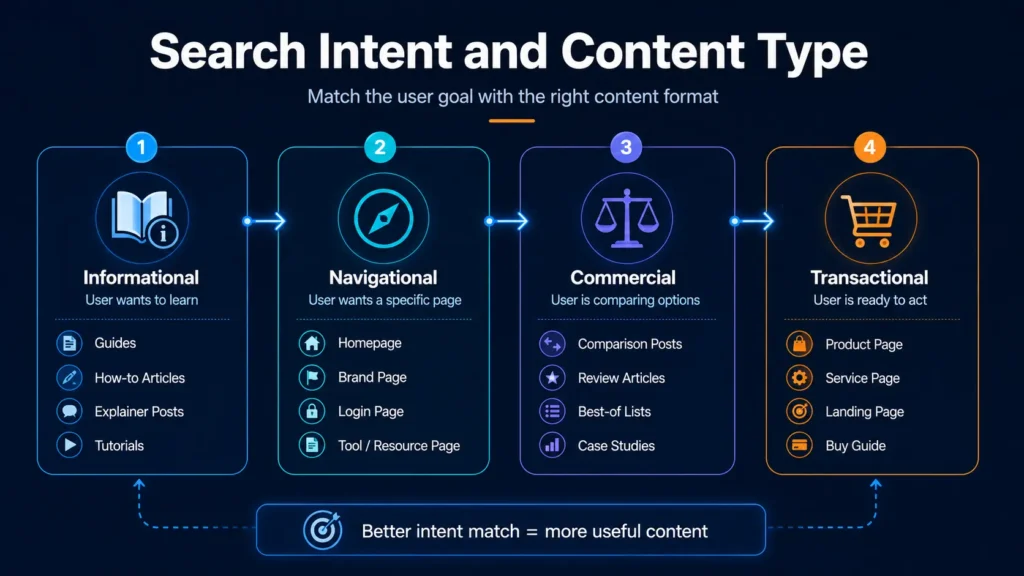
Once you understand the search intent, choose a content type that fits the user’s need.
For Informational Intent
Create:
- Tutorials
- Beginner guides
- Explanations
- Checklists
- Problem-solving articles
For Navigational Intent
Make sure your:
- Homepage is clear
- Brand name is consistent
- Important pages are easy to find
- Navigation menu is simple
For Commercial Intent
Create:
- Honest comparisons
- Product or tool reviews
- Alternatives lists
- Pros and cons
- Buying guides
For Transactional Intent
Create:
- Service pages
- Product pages
- Pricing sections
- Signup or booking pages
- Clear contact options
The goal is not to force every keyword into a blog post. Kabhi-kabhi sahi answer ek guide nahi, balki service page, comparison page ya tool bhi ho sakta hai.
Once the content type is clear, follow an on-page SEO guide to improve the title, headings, images, links and other page elements.
What Is Mixed Search Intent?
Some keywords do not fit perfectly into only one category. Google may show different types of results because users searching for the same phrase may have different needs.
This is called mixed search intent.
For example, a keyword such as “WordPress SEO” may show:
- Beginner guides
- Plugin pages
- Setup tutorials
- Videos
- Tool comparisons
Some users may want to understand WordPress SEO, while others may be looking for an SEO plugin or setup method.
How to Handle Mixed Intent
When the search results are mixed:
- Identify the most common result type.
- Choose the intent that best matches your target audience.
- Cover secondary questions naturally where useful.
- Avoid trying to satisfy every possible intent in one article.
A focused page is usually more useful than a page that mixes too many unrelated goals.
Common Search Intent Mistakes
Understanding common mistakes can help you avoid wasting time on content that does not match the reader’s need.
Choosing a Keyword Only Because It Has Search Volume
A keyword may look attractive because many people search for it, but it may not suit your website, audience or content type.
Relevance and intent should be checked before creating the article.
Writing an Article for Every Keyword
Not every keyword needs a blog post.
Some keywords require:
- A product page
- A category page
- A service page
- A comparison page
- A tool
- A video
Always choose the format according to the user’s need.
Ignoring the Current Search Results
Keyword wording can sometimes be misleading. Checking the actual search results gives you a clearer picture of the dominant intent.
Mixing Too Many Intentions
A page that tries to teach, compare, sell and promote several services at the same time can become confusing.
Keep one primary intent and support it with relevant secondary information.
Using a Misleading Title
A title may promise a complete guide, but the page may provide only a short definition. Or a title may say “best tools” while the article discusses only one tool.
The title, content and intent should match.
Assuming Search Intent Never Changes
Search behaviour can change over time. New tools, updates, products or trends may influence what users expect.
Important pages should occasionally be checked to confirm that the content still matches the current search results.
Search Intent and Earning Opportunities
Search intent can also help you understand how different content supports the earning journey of a website.
Informational Content
Informational posts can:
- Bring new visitors
- Build trust
- Answer beginner questions
- Introduce readers to your website
- Support email subscribers or returning visitors
These posts usually focus more on learning than immediate income.
Commercial Content
Commercial posts can:
- Help readers compare tools or services
- Support honest affiliate opportunities
- Attract visitors who are closer to a decision
- Build authority through useful comparisons
Commercial content should remain balanced and transparent.
Transactional Content
Transactional pages can:
- Generate service enquiries
- Support product sales
- Encourage downloads or signups
- Convert interested visitors into leads or customers
However, transactional pages need strong trust, clear information and a genuine offer.
Navigational Searches
Navigational searches can reflect brand awareness.
When people search directly for your website or brand name, it may mean they already know or remember you. This usually develops slowly through useful content and consistent visibility.
A growing website may create content for all four types of search intent, but the right balance depends on its audience, stage and business model.
Practical Search Intent Checklist
Before creating content around a keyword, ask these questions:
- What does the person actually want?
- Is the intent informational, navigational, commercial or transactional?
- What type of pages are currently appearing in Google?
- What content format is most common?
- Does this keyword match my target audience?
- Can I provide a clear and useful answer?
- Am I choosing the topic only because of search volume?
- Does the title match the actual content?
- Is there a mixed intent that should be considered?
- What should the reader understand or do after reading the page?
If these questions are clear, you will have a stronger direction before starting the content.
Frequently Asked Questions About Search Intent
What is search intent in SEO?
Search intent is the main purpose behind a user’s search query. It helps you understand whether the person wants to learn something, visit a particular website, compare options or take an action such as buying, downloading or contacting a service provider.
What are the four common types of search intent?
The four commonly used types are:
- Informational intent
- Navigational intent
- Commercial intent
- Transactional intent
These categories help content creators choose a suitable page type and content format for a keyword.
How can beginners identify search intent?
Start by studying the words used in the keyword. Then search the keyword on Google and observe the types of pages appearing in the results.
Check whether most results are guides, videos, comparisons, product pages, category pages or service pages. The dominant result type usually provides a useful clue about what users expect.
Can one keyword have more than one search intent?
Yes. Some keywords have mixed search intent because different users may search for the same phrase with different goals.
For example, a keyword such as “WordPress SEO” may show beginner guides, plugin pages, setup tutorials and tool comparisons. In such cases, focus on the most common intent and the needs of your target audience.
Is search intent the same as keyword research?
No. Keyword research helps you discover the words and phrases people search for. Search intent helps you understand what those people expect to find.
Both are connected. A keyword may look relevant, but you should understand its intent before deciding what type of content to create.
Can search intent change over time?
Yes. Search behaviour and search results may change because of new products, tools, updates or changes in user needs.
Important posts should occasionally be reviewed to confirm that their format and information still match what users are looking for.
Conclusion
Finding a keyword is only one part of creating useful SEO content. Before writing, you also need to understand why someone is searching for that keyword and what type of answer they expect.
Informational searches usually require helpful guides or explanations. Navigational searches lead users towards a specific website or page. Commercial searches involve comparison and research, while transactional searches are closer to an action such as buying, downloading or contacting a service provider.
You do not need to depend only on an expensive SEO tool to understand basic search intent. Keyword wording, current Google results, content formats and search-result features can give you useful clues.
The goal is simple: create the right content for the right reader need.
When your keyword, title, content format and search intent work together, your article becomes clearer and more useful. This does not guarantee rankings, but it gives your content a stronger and more reader-focused direction.
Start With the Right Keyword and Intent
Before creating your next article, choose a relevant keyword, check the current search results and ask what the user actually wants to find.
If you are still learning how to choose suitable keywords, read the Keyword Research Guide for Beginners to understand the process step by step.