
A Simple Guide to Make Your Website Google-Friendly
If you’re reading this post, there’s a good chance you’ve already started blogging or have a goal you want to pursue. Technical SEO for Beginers guide will help you understand the basic technical settings that make your blog faster, safer, and more Google-friendly.
In previous posts, we’ve discussed content writing, keyword research, off-page SEO, backlinks, on-page SEO, and more.
So, let’s talk about technical SEO. Okay, another one?
Yes, let’s understand what technical SEO is.
Technical SEO for beginners is what I’ve tried to explain in this post, and if it helps you even a little, I’ll consider my efforts successful.
It’s very important to explain technical SEO to beginners because it means setting up your website so that Google can easily crawl, understand, and index it.
Keep this in mind: if Google doesn’t understand your website properly, even with good content, ranking problems may occur.
In this guide, we’ll explain technical SEO for beginners in simple language. Just the practical things a beginner blogger or website owner should know.
What is Technical SEO?
आसान शब्दों में समझें तो , Technical SEO refers to the behind-the-scenes work that helps search engines find, crawl, and understand your website. It’s like cleaning the back of a website. Let’s say you built a beautiful house. The exterior design is beautiful, the furniture inside is nice, but the driveway is bad, the gate is closed, there’s no light, and the address isn’t clear. How will guests come? The same applies to a website.
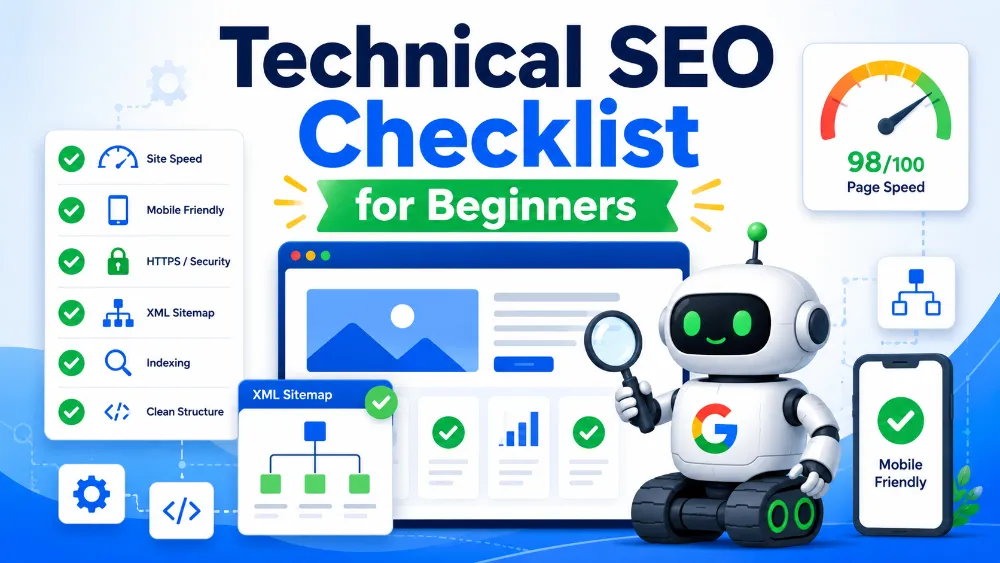
The purpose of this Technical SEO for Beginners post is to explain these terms, which primarily include : – Website speed, mobile-friendly design, crawlability, indexing, sitemap, robots.txt, SSL certificate, URL structure, broken links, duplicate content, schema markup, and Core Web Vitals.
These terms may seem very technical, but at the beginner level, you only need to understand the basics.
The goal of technical SEO is : Your website should be easily found and understood by Google, and users should have a good experience.
Why Technical SEO is Important for Beginners
If you’re starting blogging this year, you might think that simply writing good articles is enough. That’s not true. Website experience is just as important as content for Google rankings.
Not only this, you now need to ensure that your site is readable by AI like Chat GPT, Perplexity, Gemini, and others.
If your website opens slowly, users will back out. If the text appears small on mobile, readers won’t read the article. If a page isn’t indexed in Google, how will it appear in search results?
This is why learning Technical SEO for Beginners is essential.
If you have even a beginner’s level of technical SEO knowledge, focusing on it from the start can reap these benefits.
Your chances of your pages being indexed in Google increase. Your website becomes faster. Mobile users get a better experience. Crawl errors are reduced. Broken links are fixed. Google understands your site structure better.
Let’s take a real-life example.
If you’ve written a good article on “How to Start Blogging,” but it’s showing “Discovered – currently not indexed” in Google Search Console, the problem may not be with the content. It could be with technical SEO.
Therefore, it’s a good decision to practice technical SEO from an early age.
Step-by-Step Technical SEO Guide for Beginners
Make Sure Your Website is Indexable
First, check whether Google can index your website.
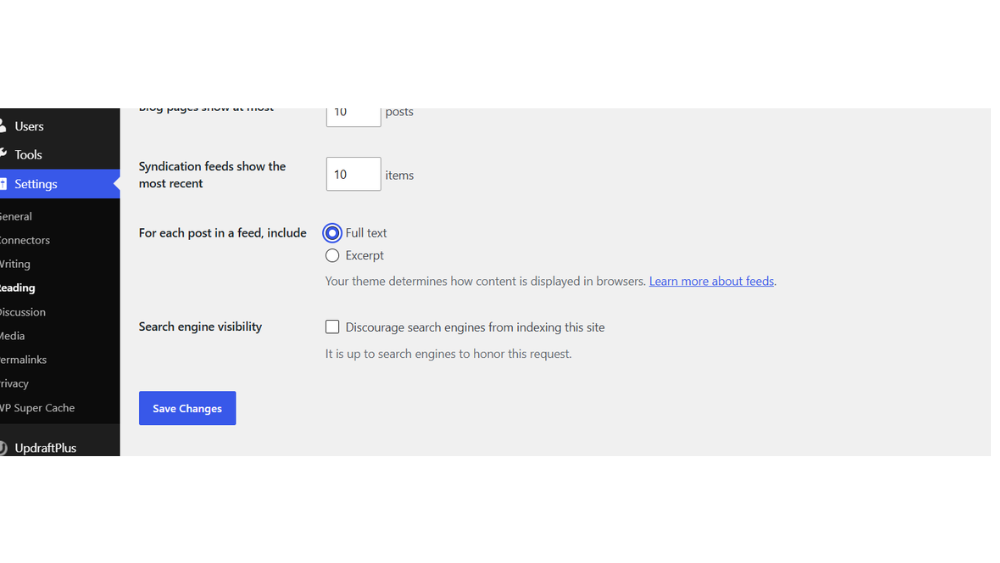
Many WordPress beginners mistakenly leave the “Discourage search engines from indexing this site” option enabled. If it’s enabled, Google won’t index your website.
To check, go to the WordPress dashboard:
Settings > Reading > Search engine visibility
The box should be unchecked here.
Then search Google:
site:yourdomain.com
If your website’s pages are visible, it means Google has indexed some pages.
Submit Sitemap in Google Search Console
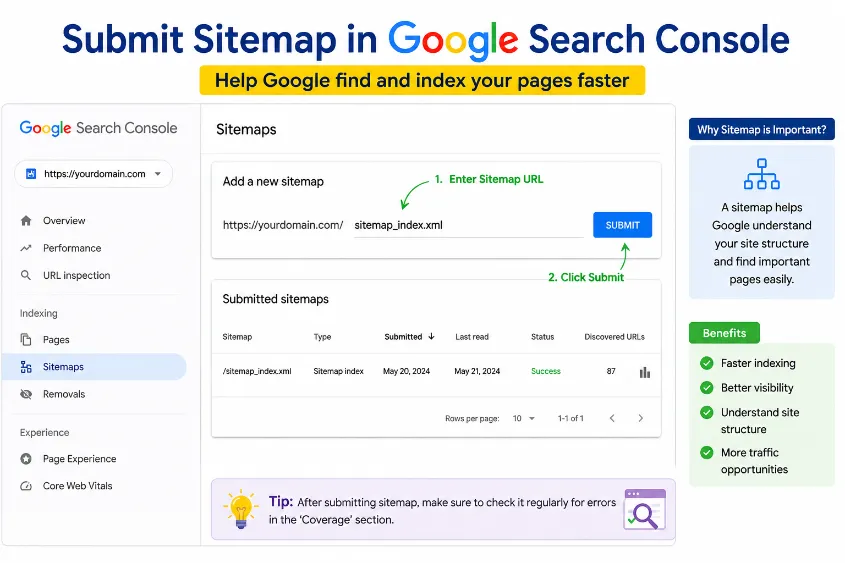
A sitemap is a map of your website. It tells Google which pages and posts are available on your website.
If you use a plugin like Rank Math, Yoast SEO, or AIOSEO, a sitemap is automatically created.
Usually, the sitemap URL looks like this:
yourdomain.com/sitemap_index.xml
Go to Google Search Console, then submit the sitemap URL in the Sitemaps option.
This step is very important in Technical SEO for Beginners, as it helps Google understand your site structure.
Check Robots.txt File
The robots.txt file instructs Google bots which pages to crawl and which not to.
Beginners shouldn’t tamper with it too much. Incorrect robots.txt settings can block your entire website from Google.
You can check your robots.txt file like this:
yourdomain.com/robots.txt
If you’re unsure, leave the default settings. SEO plugins like Rank Math have the option to edit robots.txt, but don’t change it unnecessarily.
Simply put, robots.txt is the website’s gatekeeper. If the gatekeeper gives the wrong instructions, Google bots won’t be able to access.
Improve Website Speed
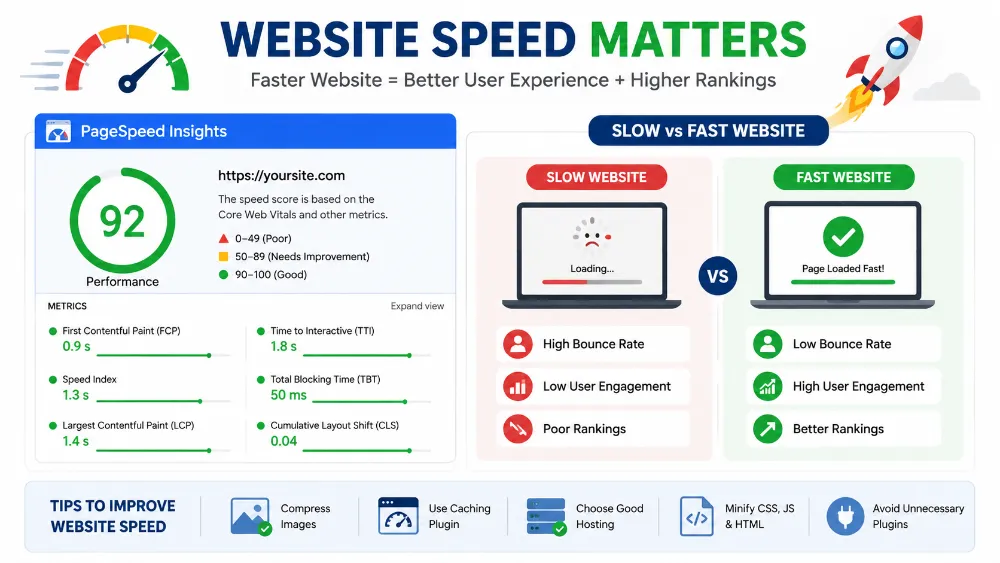
Website speed is a very important part of technical SEO.
If you’re a beginner, remember: users don’t wait. If a website takes 5–6 seconds to load, many people will hit the back button.
To improve speed:
Use a lightweight theme like GeneratePress. Minimize heavy plugins. Compress images. Use a cache plugin. Avoid unnecessary animations and heavy sliders. Maintain good hosting quality.
You can use tools like PageSpeed Insights or GTmetrix to check speed.
But keep one thing in mind: don’t obsess over a 100 score. For beginners, the goal should be to have a website that is fast, clean, and usable.
Make Your Website Mobile-Friendly
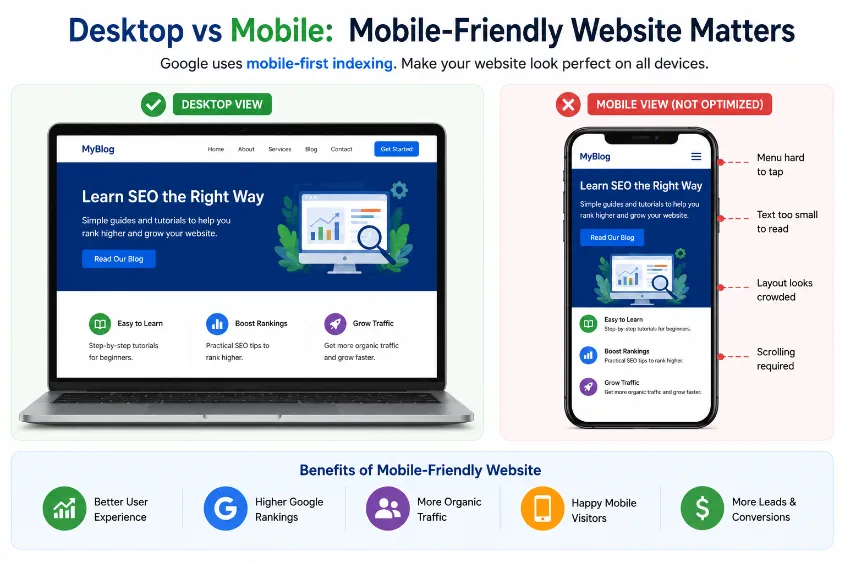
Many people search on mobile these days. Therefore, your website should look good on mobile.
A mobile-friendly website means:
Text should be easy to read. Buttons should be easy to click. Images shouldn’t go off the screen. Menus should open properly. Pages shouldn’t scroll horizontally.
Using a responsive theme in WordPress like GeneratePress, Astra, or Kadence makes mobile design easier.
But still, before publishing every page, do check the mobile preview.
Use Clean URL Structure
The URL should be simple and readable.
Bad URL example:
yourdomain.com/p=123?id=seo-post-new
Good URL example:
yourdomain.com/technical-seo-for-beginners
A clean URL is good for both Google and users.
In WordPress, go to:
Settings > Permalinks > Post name
This is the best option for beginner bloggers.
Avoid unnecessary numbers, dates, and random characters in the URL.
Fix Broken Links
Broken links are links that lead to a 404 error page.
Example: You provided a link to an old article, but that page was later deleted. Now, when a user clicks on that link, an error will appear.
This degrades the user experience and can also negatively impact SEO.
You can use a Broken Link Checker plugin or online tools to find broken links. However, keeping the plugin always active can slow down your website. Therefore, it’s best to check and deactivate the plugin.
Use HTTPS / SSL Certificate
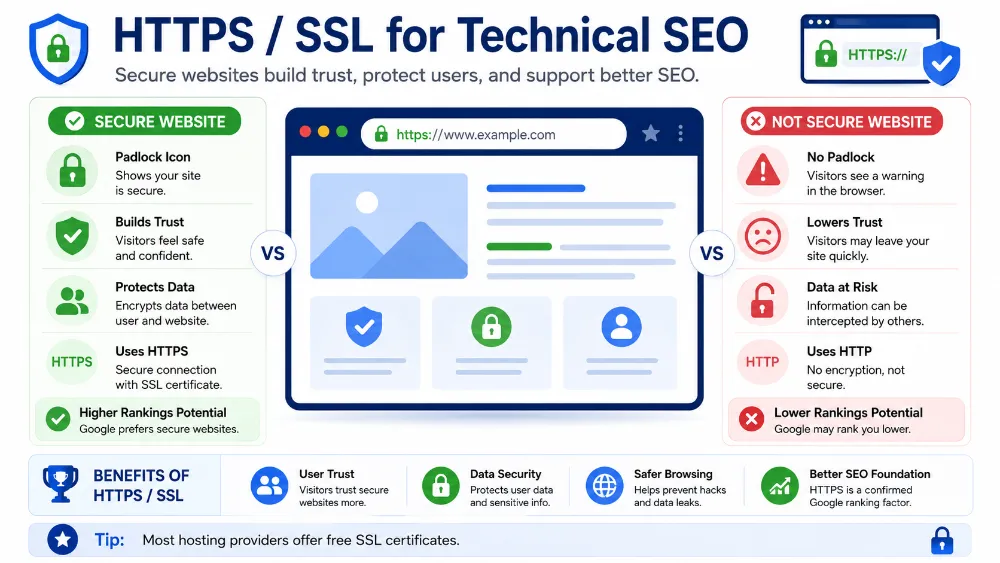
If your website URL shows https://, SSL is active. If only http:// is displayed, SSL is not.
SSL makes a website secure. Nowadays, HTTPS is required for every website.
Most hosting companies provide free SSL. If your site shows “Not Secure,” enable SSL in the hosting panel or seek help from hosting support.
This may seem like a small step in technical SEO for beginners, but it’s crucial for building trust.
Avoid Duplicate Content
Duplicate content means the same or very similar content is present on multiple pages.
Beginner bloggers often repeat the same paragraph in different posts. Or, category, tag, or author pages are indexed, which can lead to duplicate content issues.
Don’t create unnecessary tags in WordPress. Use one main category and limited tags for each post.
Use the noindex setting in SEO plugins carefully. If you’re not familiar, keep the default settings and learn gradually.
Add Schema Markup
Schema markup helps Google understand your content type.
Example: Whether your article is an FAQ, a review, a how-to guide, a recipe, or a blog post.
Plugins like Rank Math and Yoast can automatically add a basic schema.
For beginners, it’s enough to select the correct article type and write the FAQ section properly.
Schema doesn’t guarantee ranking, but it can help Google understand context.
Practical Technical SEO Tips for Beginners
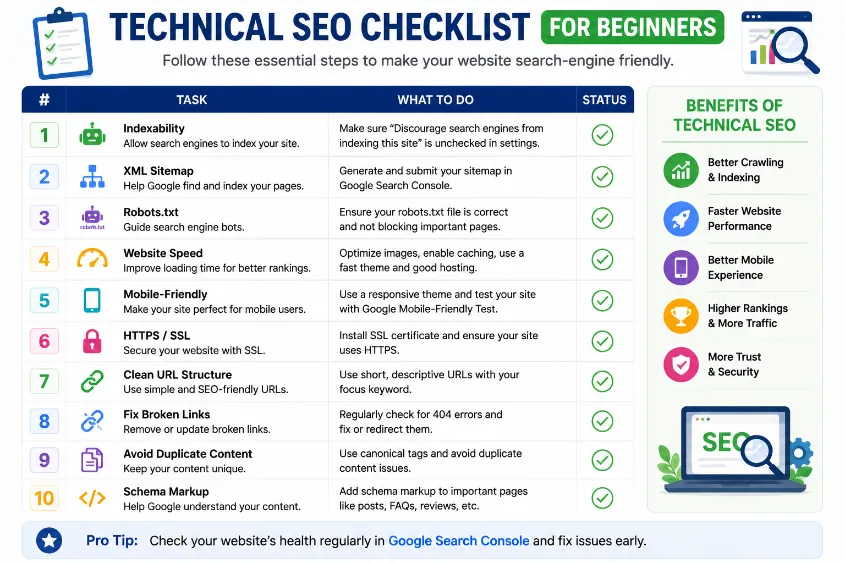
If you’re a beginner, don’t try to perfect everything all at once. First, follow a basic technical SEO checklist.
Check the URL before publishing each new blog post. Compress image sizes. Add internal links. Check the mobile preview. Write a meta title and description. Check the indexing status in Search Console.
Once every month, open Google Search Console and see which pages aren’t being indexed, which errors are occurring, and which keywords are getting impressions.
The best approach to technical SEO for beginners is: learn a little, apply, and then see the results.
Common Technical SEO Mistakes Beginners Make
The most common mistake is ignoring website speed. Beginners, in an attempt to make the design beautiful, add heavy images, sliders, animations, and extra plugins. This slows down the website.
The second mistake is installing plugins for every little thing. WordPress plugins are useful, but too many plugins can make the website heavy.
The third mistake is not submitting a sitemap. Many beginners publish articles and assume Google will automatically rank everything immediately. Google can crawl, but submitting a sitemap improves the process.
The fourth mistake is not checking the mobile preview. The page looks good on desktop, but on mobile, the images may be large, the text small, or the buttons misaligned.
The fifth mistake is ignoring Search Console. Search Console is your website’s health report card. If you don’t check it, you won’t know how Google is viewing your site.
FAQs :
Technical SEO means improving the technical setup of your website so Google can crawl, index, and understand it easily. It includes speed, mobile-friendliness, sitemap, indexing, HTTPS, and site structure.
No, beginner-level technical SEO is not very difficult. You do not need advanced coding knowledge. If you use WordPress and a good SEO plugin, many basic things become easier.
Technical SEO helps Google access your website properly. If your pages are not indexable, your site is slow, or mobile experience is poor, ranking becomes difficult even if your content is good.
You can search on Google: site:yourdomain.com. You can also use Google Search Console to check indexing status and see which pages are indexed or not indexed.
For basic Technical SEO for Beginers, coding is not necessary. You can handle most important tasks using WordPress settings, SEO plugins, caching plugins, and Google Search Console.
The first step is to make sure your website is indexable. After that, submit your sitemap in Google Search Console and check mobile-friendliness and speed.
For beginners, checking once or twice a month is enough. You should also check after changing theme, installing new plugins, or redesigning important pages
Conclusion
Technical SEO may sound difficult at first, but it becomes simple when you understand the basics step by step.
Simple तरीके से समझें तो, Technical SEO for Beginers is about making your website easy for Google and easy for users. Your content should be readable, your website should load fast, your pages should be indexable, and your mobile design should be clean.
Do not try to become an expert in one day. Start with sitemap, indexing, speed, mobile-friendly design, SSL, and clean URLs. These small improvements can make your website stronger over time.
Agar aap beginner ho to याद रखें: SEO is not magic. It is a process. Learn one thing, apply it, and improve slowly.
Now tell me in the comments: Which technical SEO topic confuses you the most — sitemap, indexing, speed, robots.txt, or Search Console?
Also, bookmark this guide so you can return whenever you check your website’s SEO health.
In the next article, I can explain Google Search Console for Beginners in a simple step-by-step way.
1 thought on “Technical SEO for Beginners”